
How to Livestream Sell on Facebook and Close More Orders
Vietnamese
Quick answer: To effectively livestream sell on Facebook and close more orders, focus on engaging viewers directly. Start by showcasing products clearly, perhaps demonstrating a feature every 2-3 minutes. Encourage real-time questions and respond promptly, creating a personal shopping experience. Offer exclusive deals or limited-time discounts during the stream, like a 15% off code valid for the next 30 minutes, to drive immediate purchases.
Over the past few years, livestream selling on Facebook has become one of the fastest and most effective sales channels for online shops, spanning fashion, cosmetics, and food. Unlike static posts, livestreaming lets sellers interact directly with customers, answer questions instantly, and create a sense of scarcity that pushes shoppers to buy faster.
That said, not every livestream delivers the sales results sellers expect. Many sellers go live every day yet close very few orders, usually because they lack a script, don't know how to keep viewers engaged, or haven't mastered the right closing techniques. This article walks you through the entire process — from preparation and scripting to engagement tips — so every broadcast turns into real orders.
Why Is Livestream Selling on Facebook So Effective?
Facebook is the social network with the largest user base in Vietnam, and its algorithm prioritizes showing live video to a page's friends and followers. When a livestream is running, Facebook pushes notifications to people who have previously interacted with the fan page, helping the broadcast reach its audience organically without extra ad spend.
Livestreaming also triggers three psychological drivers behind purchase decisions: authenticity (viewers see the real, unedited product), scarcity (limited stock, prices valid only during the live session), and social proof (comments and shares from other viewers create a bandwagon effect). These are elements a regular sales post can rarely deliver in full.
The Power of Real-Time Interaction
One of the most significant advantages of livestream selling is the real-time interaction it offers. Imagine a customer browsing an online store, seeing a dress they like, but having questions about its fit or fabric. In a traditional e-commerce setting, they might send an email or use a chat function, waiting minutes or even hours for a response. During a livestream, however, they can ask their question directly in the comments, and the seller can answer it instantly, even demonstrating the product's features right then and there. This immediate feedback loop builds trust and removes purchase barriers much faster than static content.
Building a Community and Brand Loyalty
Beyond direct sales, livestreams help foster a sense of community around your brand. Regular viewers start to recognize your host, anticipate your next session, and even interact with each other in the comments. This community aspect transforms a transactional relationship into a more personal one. When customers feel connected to a brand, they are more likely to become repeat buyers and brand advocates, sharing your livestreams and products with their friends and family. This organic growth is invaluable for long-term business success.
Preparing Before You Go Live to Sell
A livestream that closes plenty of orders is usually planned well in advance rather than improvised. Before hitting the "go live" button, sellers should:
- Pick a prime time slot: typically 8–10 p.m. on weekdays or the midday window from 11 a.m. to 1 p.m., when Facebook usage peaks.
- Prepare products, order codes, and a clear price list in advance to avoid fumbling when questions come in fast.
- Check your internet connection, lighting, and camera angle so products look authentic on screen, without dark or shaky footage.
- Post a schedule announcement a few hours ahead so returning customers know when to tune in.
- Line up an order-closing team (answering comments and inbox messages) alongside the host so no customer gets missed.
Beyond preparing content, getting a strong viewer count in the first few minutes matters just as much, since Facebook tends to recommend videos that are already gaining traction. Many shops pair this with a Facebook video views boosting service for their pre-live teaser videos to widen reach and create a crowd effect right as the broadcast begins.
Detailed Preparation Checklist
To ensure a smooth and successful livestream, consider the following detailed preparation checklist:
- Product Inventory & Display:
- Ensure all featured products are easily accessible and organized.
- Assign unique, easy-to-remember order codes for each product.
- Create a physical or digital price list that is readily visible to the host and order-closing team.
- Plan the order in which products will be showcased to maintain a good flow.
- Have backup products ready in case a featured item sells out quickly or needs to be swapped.
- Technical Setup:
- Internet: Test your internet speed well in advance. A wired connection is always more reliable than Wi-Fi for streaming.
- Lighting: Invest in good lighting (ring lights, softboxes) to ensure products are clearly visible and colors are accurate. Avoid harsh shadows.
- Camera: Use a high-quality smartphone or dedicated webcam. Ensure it's stable (tripod recommended) and positioned at an eye-level angle.
- Audio: A clear microphone (lavalier or external USB mic) is crucial for good sound quality. Test for echoes or background noise.
- Background: Choose a clean, uncluttered background that reflects your brand's aesthetic. Avoid distractions.
- Pre-Live Promotion:
- Create engaging teaser posts and stories on Facebook, Instagram, and other relevant platforms.
- Use countdown timers and "remind me" features to encourage sign-ups.
- Highlight specific products or exclusive deals that will be available during the livestream.
- Consider running a small ad campaign to promote your livestream to a targeted audience.
- Team Coordination:
- Host: The face of the livestream, responsible for presenting products, engaging viewers, and driving sales.
- Comment Moderator/Order Taker: Monitors comments, answers questions, takes down order details, and flags important comments for the host.
- Technical Support: Someone to troubleshoot any technical issues that arise during the live session.
- Inventory Manager: Keeps track of stock levels in real-time, especially for limited-quantity items.
The Importance of a Pre-Live Teaser Strategy
A successful livestream doesn't start when you hit "go live"; it begins much earlier with effective pre-live promotion. Teaser videos and posts serve several critical functions:
- Building Anticipation: They generate excitement and curiosity, making viewers eager to tune in.
- Audience Collection: They act as a magnet, drawing in potential viewers and reminding past customers.
- Algorithmic Boost: Videos that quickly gain views and engagement before going live are more likely to be favored by Facebook's algorithm, leading to higher organic reach when the main event begins. This initial boost can be significantly enhanced by a Facebook video views boosting service, which creates a strong signal to Facebook that your content is popular and should be shown to more users.
- Setting Expectations: Teasers can inform viewers about the types of products, promotions, or special guests they can expect, helping them decide if the livestream is relevant to them.
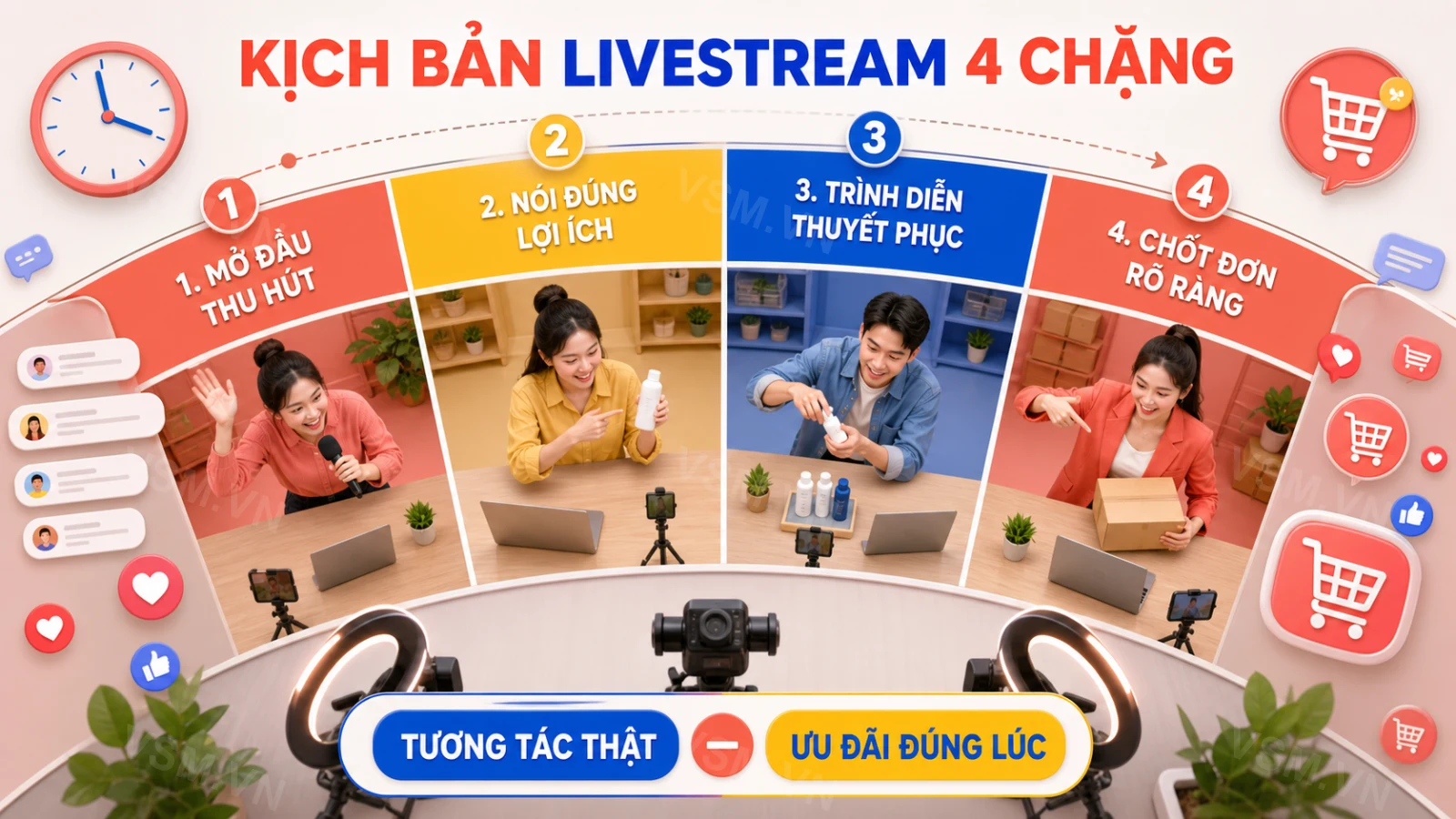
Building a Stage-by-Stage Livestream Selling Script
A well-structured script is the backbone of a high-converting livestream. It ensures you cover all essential points, maintain a logical flow, and keep viewers engaged from start to finish. Here’s a detailed breakdown:
Opening Stage (First 5–10 Minutes)
This is the most critical stage, as it determines whether viewers stay or leave. The host should greet the audience, briefly introduce the promotion or featured products for the session, and encourage viewers to comment and hit "like" to boost the video's engagement.
Opening Stage Script Elements:
- Warm Welcome & Personal Greeting: "Hello everyone, welcome to [Your Brand]'s live selling session! I'm [Host's Name], and I'm so excited to be with you all tonight."
- Engagement Call to Action (Early): "Before we dive in, please hit the like button, share this livestream with your friends, and let me know where you're watching from in the comments!"
- Brief Overview of Session's Highlights: "Tonight, we have an amazing lineup of [product category, e.g., 'new arrivals,' 'winter collection'] with exclusive discounts only available during this live. Get ready for some incredible deals!"
- Introduce First Giveaway/Mini-Game: "To kick things off, we're giving away [small prize] to one lucky commenter who shares this live and tags two friends. I'll announce the winner in 10 minutes!" This incentivizes early engagement and sharing.
- Set the Tone: Be energetic, friendly, and enthusiastic. Your energy is contagious.
Middle Stage (Core Content)
This is when you introduce each product in detail — material, use, styling or usage tips — backed by real demonstrations (trying it on, testing it live). Weave in mini-games and random discount codes for commenters to keep viewers watching longer.
Middle Stage Script Elements:
- Product Presentation (Detailed): For each product:
- Name & Code: Clearly state the product name and its unique order code (e.g., "This is our 'Serenity Silk Scarf,' code SSS-001").
- Key Features & Benefits: Describe materials, craftsmanship, unique selling points. Focus on benefits to the customer. "It's made from 100% pure mulberry silk, so it's incredibly soft on your skin and won't snag your hair."
- Demonstration: Show the product in action. For clothing, try it on, show different ways to style it. For cosmetics, apply it. For food, describe the taste and texture.
- Usage Tips/Styling Advice: "You can wear this scarf as a head wrap, a chic necktie, or even tie it on your handbag for a pop of color."
- Pricing & Promotion: Clearly state the special livestream price. "Normally $50, but tonight, it's only $35!" Mention any bundle deals.
- Call to Action (Per Product): "To order this Serenity Silk Scarf, simply comment 'SSS-001 + Quantity' or send us an inbox message right now!"
- Engagement Breaks (Mini-Games & Q&A):
- Mini-Games: "Quick quiz! What color am I wearing right now? First correct answer gets an extra 10% off!" or "Guess the price of our next item, closest guess wins a gift!"
- Viewer Q&A: Periodically pause to address questions from the comments. "I see a question from [Viewer's Name] asking about the sizing. Let me show you..."
- Flash Discounts: Announce a random discount code for a specific product or a percentage off for the next five orders. "Use code 'FLASH15' for 15% off the next five purchases of our 'Sunshine Dress'!"
- Social Proof Reinforcement: "We've already sold 20 of these amazing scarves tonight! Don't miss out!"
- Transitioning Between Products: Smoothly move from one item to the next, maintaining energy. "Alright, if you loved the scarf, you're going to adore our next item..."
Closing Stage
Once you've built enough interest, give a clear call to action: "Inbox now to lock in this price," "Comment SIZE + color to order," paired with a time or quantity limit to create urgency. The comment-response team needs to reply fast — making customers wait too long can kill their buying momentum.
Closing Stage Script Elements:
- Recap of Best Sellers & Key Promotions: "Just a quick reminder of our hottest items tonight: the Serenity Silk Scarf, our Bestselling Sunshine Dress, and the Everlasting Lipstick. All still available at special livestream prices!"
- Final Call to Action with Urgency: "This is your last chance to grab these deals! Prices go back to normal when the livestream ends, and some items are almost sold out." "We only have 3 of the Sunshine Dress left in size M!"
- Clear Ordering Instructions: Reiterate how to order (comment format, inbox message). Pin a comment with these instructions.
- Announce Winners/Next Steps for Giveaways: "Congratulations to [Winner's Name] for winning our earlier giveaway! Please inbox us to claim your prize."
- Thank You & Future Engagement: "Thank you so much for tuning in tonight! Your support means the world to us." "Don't forget to follow our page for updates on our next live session, coming this [Day of Week]!"
- Encourage Shares & Reviews: "If you enjoyed this live, please share it with your friends, and we'd love to see your reviews once you receive your orders!"
- Host's Farewell: "That's all for tonight, folks! Have a wonderful evening, and happy shopping!"
Techniques to Boost Engagement and Keep Viewers Watching
Engagement — comments, shares, reactions — doesn't just help Facebook recommend your video to more people; it's also a social signal that builds trust with new viewers. Shops commonly use techniques such as:
- Asking interactive questions continuously, such as which color or size viewers prefer, to prompt spontaneous comments.
- Running quick mini-games (price-guessing, lucky spins) between product segments.
- Announcing the number of orders closed in real time to create a bandwagon effect ("50 orders closed in the last 10 minutes!").
- Pinning a comment with ordering details so new viewers can quickly learn how to buy.
If you want to dig deeper into keeping your viewer count steady throughout a broadcast, check out our guide on how to increase Facebook livestream viewership and apply it alongside the selling script above.
Advanced Engagement Strategies
Beyond the basics, here are some advanced tactics to supercharge your livestream engagement:
- Interactive Polls & Quizzes: Use Facebook's built-in poll feature or simply ask viewers to type their answers in the comments. "Which of these two dresses do you prefer for a summer wedding? Comment 'A' or 'B'!"
- "Bring a Friend" Incentives: Offer an extra discount or a special gift to viewers who tag a friend in the comments and that friend makes a purchase during the live.
- Viewer Shout-outs & Personalization: Acknowledge specific viewers by name in the comments. "Thanks for tuning in, [Viewer's Name]! Great question about the fabric." This makes viewers feel seen and valued.
- Behind-the-Scenes Glimpses: Occasionally share a quick peek at your workspace, how products are packed, or introduce a team member. This adds a personal touch and builds rapport.
- Product Customization/Styling Challenges: Ask viewers to suggest ways to style a product or combine different items. "How would you wear this jacket? Give me your best styling tip!"
- Sequential Giveaways: Instead of one big giveaway at the end, have several smaller ones throughout the session. This keeps viewers hooked, waiting for the next chance to win.
- Collaborate with Influencers: Bring on a local micro-influencer as a guest host for a segment. Their audience will tune in, and their endorsement adds credibility.
- "Mystery Box" or "Blind Buy" Offers: Create excitement by offering a mystery box at a discounted price, where viewers don't know the exact contents until they receive it. This taps into curiosity and the thrill of surprise.
Leveraging Analytics for Better Engagement
After each livestream, dive into your Facebook Page Insights. Pay close attention to:
- Peak Viewership: When did most people tune in? This helps refine your timing.
- Audience Demographics: Who is watching? Tailor your product selection and language to this audience.
- Engagement Rate: How many comments, reactions, and shares did you get relative to your viewership? Identify segments where engagement was high or low.
- Watch Time: Where did viewers drop off? This indicates areas where your content might have lagged or lost interest.
By analyzing these metrics, you can continuously refine your script, engagement tactics, and product presentation to ensure each subsequent livestream performs better than the last. For instance, if you notice a significant drop-off when you introduce a particular product category, you might reconsider featuring it or change its presentation style.
Safety Tips for Livestream Selling on Facebook
To keep your broadcast from being limited in reach or your account flagged as suspicious, sellers should keep the following in mind:
- Avoid sensitive language, comparisons to competitors, or overstated product claims (especially for cosmetics and supplements), as these easily violate Facebook's advertising policies.
- Avoid boosting views or comments with tools of unclear origin; instead, prioritize reputable, transparent engagement services that won't hurt your page's credibility.
- Save the recording after each broadcast to reuse for remarketing content or to cut into short clips for reposting.
- Track post-live metrics (average view count, retention rate, comment volume) to learn and improve for the next session.
Facebook's Content Policies and Guidelines
Understanding and adhering to Facebook's Community Standards and Advertising Policies is paramount to maintaining a healthy page and avoiding penalties. Key areas to be mindful of include:
- Misleading Claims: Be truthful about product efficacy, ingredients, and origin. Exaggerated claims, especially for health-related products, are red flags.
- Prohibited Content: Absolutely no hate speech, nudity, graphic violence, or promotion of illegal activities.
- Intellectual Property: Do not use copyrighted music, images, or brand names without proper authorization.
- Personal Information: Be cautious about sharing or asking for sensitive personal information during the live session. Direct customers to private messages for such details.
- Engagement Manipulation: Facebook's algorithms are sophisticated. Using bots or services that generate fake views, likes, or comments can lead to severe penalties, including reduced reach, temporary bans, or even permanent page deletion. Always opt for genuine, organic growth strategies or reputable services that ensure real engagement.
Repurposing Livestream Content
A single livestream can be a goldmine of content that extends its value far beyond the live broadcast itself. Here’s how to effectively repurpose your recordings:
- Full Replays: Post the full recording on your Facebook page, website, and YouTube channel. This allows those who missed the live session to catch up and continues to drive sales.
- Highlight Reels: Edit the best moments into a short highlight reel (1-3 minutes) showcasing key products, funny moments, or special offers. Use these for Instagram Reels, TikTok, and Facebook Stories.
- Product-Specific Clips: Cut individual segments for each product demonstration. These can be used as evergreen product videos on your e-commerce site or in targeted ad campaigns.
- Testimonial Clips: If viewers leave positive comments during the live, screenshot them or highlight them in short clips to use as social proof in future marketing.
- Q&A Snippets: Turn popular questions and their answers into short, informative videos or text-based FAQ posts.
- Behind-the-Scenes/Blooper Reels: Share lighthearted moments or bloopers to humanize your brand and entertain your audience.
Livestream Selling vs. Regular Sales Posts
Compared with a text-and-image sales post, livestreaming closes orders far faster because customers get answers instantly and are swept up in a "buy now before it's gone" atmosphere. Regular posts, on the other hand, are better suited for sustaining long-term content, optimizing for Google SEO, and reaching customers who are actively searching. That's why an effective Facebook sales strategy should combine both: use posts to nurture and educate customers, and livestreams to drive closing surges during each promotional push.
A Holistic Facebook Sales Strategy
To maximize your sales and brand presence on Facebook, integrate livestreams and regular posts into a cohesive strategy:
- Regular Posts for Awareness & Education:
- Product Features: Detailed breakdowns of new products, highlighting unique selling propositions.
- Behind-the-Scenes: Show your brand's personality, manufacturing process, or team.
- User-Generated Content: Share customer reviews, photos, and testimonials.
- Educational Content: Tutorials, tips, and tricks related to your products or industry.
- SEO Optimization: Use relevant keywords in your text posts to improve discoverability on Facebook's search and potentially external search engines if linked.
- Livestreams for Conversion & Urgency:
- New Product Launches: Create a buzz and drive immediate sales for new collections.
- Flash Sales & Limited-Time Offers: Leverage the real-time nature to create urgency.
- Interactive Q&A Sessions: Address common customer queries directly and build trust.
- Demonstrations & Tutorials: Show products in action, proving their value and functionality.
- Community Building: Foster direct relationships with your audience, turning viewers into loyal customers.
Think of it this way: regular posts are like your storefront display and product catalog, inviting people in and informing them. Livestreams are your enthusiastic sales associate, demonstrating products, answering questions, and closing deals with a personalized touch. Both are essential for a thriving retail business.
Measuring Combined Impact
When you combine both strategies, it's crucial to measure their individual and collective impact. Track:
- Conversion Rates: How many viewers convert to buyers from livestreams vs. how many clicks on a post lead to a purchase.
- Average Order Value (AOV): Do customers tend to buy more items or higher-priced items during livestreams due to the urgency and engagement?
- Customer Lifetime Value (CLV): Do livestream buyers show higher loyalty and repeat purchases compared to those who discover products through regular posts?
- Reach & Engagement Diversity: Are different types of content reaching different segments of your audience, or are they reinforcing each other?
By understanding these metrics, you can fine-tune your content calendar, allocate resources effectively, and continuously optimize your overall Facebook sales funnel.
Frequently Asked Questions
How long should a sales livestream run? An effective livestream typically runs 60 to 120 minutes — long enough to showcase multiple products without tiring viewers out or causing them to drop off partway through. However, shorter, more frequent "mini-lives" (20-30 minutes) can also be effective for quick announcements or spotlighting a single product.
Should you livestream every day? A consistent schedule (3–5 sessions a week) helps build a viewing habit among customers, but each session needs fresh content or a new offer to avoid feeling repetitive. Quality over quantity is key; a well-prepared, engaging live stream twice a week is better than daily, rushed, uninspired sessions.
How do you know if a livestream was effective? Track metrics such as average view count, average watch time, comment volume, and the ratio of closed orders to purchase-intent comments to accurately gauge each session's performance. Also, consider post-live sales attributed to the broadcast and new follower growth.
Should you keep livestreaming even with low viewership? Yes — Facebook needs time to recognize and recommend your page to the right audience; combining reputable engagement-boosting solutions with a better script will help your viewer count grow steadily over time. Consistency builds momentum and algorithm trust.
What if I don't have a team to help with comments? If you're a solo seller, consider using automated comment management tools (many e-commerce platforms integrate with Facebook Live) or explicitly stating that you'll answer all comments and DMs immediately after the live session. Prioritize quick, clear ordering instructions.