
Guide to Download Videos from 20+ Platforms Using VSM's Free Tool
Vietnamese
Quick answer: VSM's free tool simplifies video downloads from over 20 platforms, directly addressing the core need of the guide. Users can easily acquire content without navigating complex interfaces or paying for premium services. This accessibility, combined with its broad platform support, makes it a valuable resource for anyone needing to save videos, for example, from YouTube or Vimeo. The tool streamlines the process, ensuring a straightforward experience.
Do you want to save an interesting TikTok video, an Instagram Reels clip, or a Facebook video for offline viewing, video editing, or simply to share with friends? This article will guide you on how to download videos from over 20 social media platforms using a single online tool, completely free of charge, without the need for any additional software or apps.
In the past, each platform required a different method to download: TikTok needed a third-party app, YouTube required software installed on a computer, and Facebook required inspecting the page source to get the original video link. VSM has consolidated all these complicated steps into one tool, saving users time and helping them avoid video download sites filled with sensational ads or even malware.
Why Use a Multi-Platform Video Download Tool?
Video content is becoming increasingly central in marketing, education, and entertainment. Content creators, online shop owners, teachers, or even regular users sometimes need to save videos to their devices: to watch offline when there's no internet, to analyze the style of a creator they admire, to compile material for lessons, or to repost with proper citation.
Instead of searching for dozens of different apps for each platform (one app for TikTok, another for YouTube, an extension for Facebook...), using a single web tool allows for consistent operations, doesn't take up device storage, and doesn't require sensitive access permissions like mobile apps often do.
The Evolving Landscape of Digital Content Consumption
The way we consume content has drastically shifted. Short-form videos, live streams, and interactive content dominate our feeds. This explosion of video content means that the need to save, curate, and reference these videos has never been greater. Whether you're a student compiling research for a presentation, a marketer analyzing competitor campaigns, or simply someone who wants to keep a funny cat video, a reliable download solution is essential.
Addressing Common User Pain Points
Before multi-platform tools, users faced numerous frustrations:
- Complexity: Different platforms had different rules, often requiring technical know-how or obscure workarounds.
- Security Risks: Many standalone download apps were fronts for malware or adware, compromising user data.
- Inconsistency: Download quality varied wildly, and some tools would stop working without warning due to platform updates.
- Resource Hogging: Installing multiple apps for different platforms consumed valuable device storage and processing power.
A unified web tool directly addresses these issues by offering a secure, consistent, and efficient solution that bypasses the need for local installations and the associated risks.
Which Platforms Does VSM's Video Download Tool Support?
The tool is designed to recognize links from most popular social networks and content-sharing platforms today, including:
- TikTok, Douyin, Kwai, Likee (short videos)
- YouTube, YouTube Shorts, Vimeo, Dailymotion
- Facebook (video, Reels, Watch), Instagram (Reels, Story, Post)
- Twitter/X, Threads, Pinterest, Reddit, Tumblr
- Twitch (clip), SoundCloud, Bilibili, Weibo, Snapchat, Telegram
The list of supported platforms is continuously updated according to technical changes from the social networks, so if a link doesn't download today, there's a high chance the tool will support it after a short period once the system is updated.
The Importance of Broad Platform Compatibility
In today's interconnected digital world, content often transcends a single platform. A viral TikTok might be reposted on Instagram Reels, shared on Facebook, or embedded in a YouTube compilation. For users who follow creators across various platforms, or for those who need to gather content from diverse sources, broad platform compatibility is not just a convenience, but a necessity.
Future-Proofing Through Continuous Updates
Social media platforms are constantly evolving. They regularly update their APIs, change their URL structures, and implement new security measures. A static download tool quickly becomes obsolete. VSM's commitment to continuous updates ensures that the tool remains functional and reliable, adapting to these changes behind the scenes so users don't have to worry about sudden compatibility issues. This proactive approach sets it apart from many one-off solutions that quickly fall into disrepair.
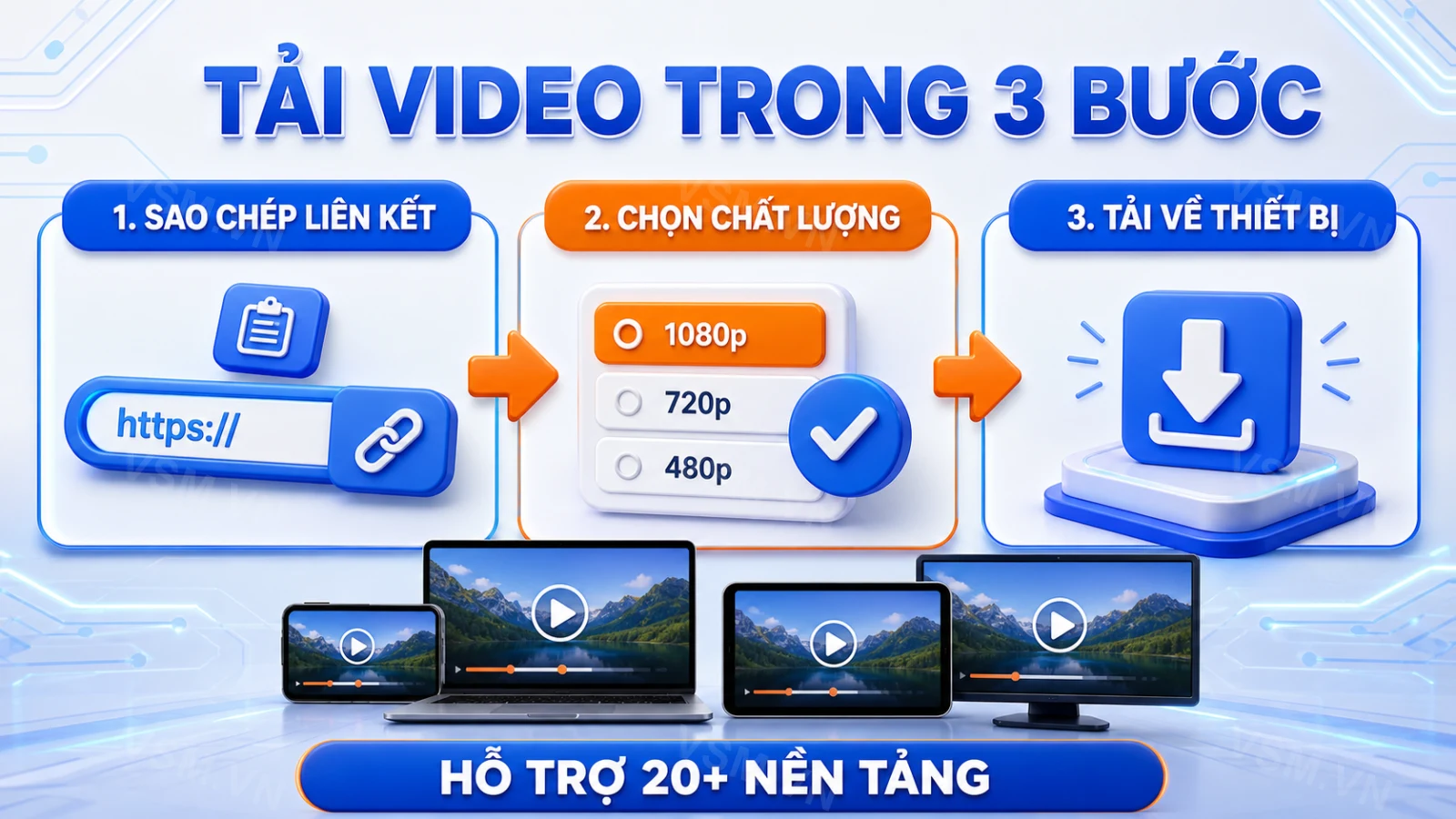
Step-by-Step Video Download Guide
Downloading a video using VSM's tool is designed to be intuitive and straightforward. Here's a detailed breakdown of each step:
Step 1: Copy the Video Link
This is the most crucial first step. You need the direct link to the video itself, not a link to the creator's profile or a general feed. Here's how to do it on common platforms:
- TikTok: Open the TikTok app, find the video you want to download. Tap the "Share" icon (usually an arrow pointing right or a three-dot menu). From the share options, select "Copy link." This will put the video's URL onto your device's clipboard.
- YouTube: On a desktop, click the "Share" button below the video player, then click "Copy." On the mobile app, tap the "Share" icon (often an arrow), then select "Copy link."
- Instagram Reels/Posts: Open the Instagram app, navigate to the Reel or post. Tap the three-dot menu icon (...) usually in the top-right corner of the post. Select "Link" or "Copy Link."
- Facebook Videos/Reels: For videos, click the three-dot menu on the video post, then "Copy link." For Reels, it's similar to Instagram – find the share option and copy the link.
- Twitter/X: On a tweet with a video, click the "Share" icon (an upward-pointing arrow) and then "Copy link to Tweet."
Pro Tip: Always double-check that you've copied the direct video link. If you accidentally copy a profile link or a general post link, the tool might not be able to process it correctly.
Step 2: Paste the Link into the Tool
Once you have the video link copied, the next step is to use the VSM tool. Visit VSM's free TikTok and multi-platform video downloader. You'll see a prominent input field on the page. Simply paste the copied link into this field. You can usually do this by right-clicking and selecting "Paste" on a desktop, or by long-pressing the input field on a mobile device and selecting "Paste." After pasting, click the "Download" button (or similar prominent button) next to the input field. The system will then automatically recognize the platform and analyze the available video versions.
Step 3: Choose Quality and Download
After the tool processes the link, it will present you with a list of available download options. This is where you can customize your download based on your needs:
- Video Quality: You might see options like 1080p, 720p, 480p, etc. Higher numbers indicate better resolution. Choose the highest quality available if you want the best visual experience, or a lower quality if you need to save storage space or have a slower internet connection.
- Watermark Options: For platforms like TikTok, the tool often provides options to download the video with or without the platform's watermark. This is particularly useful for content creators who want to repurpose content for different platforms or for personal archives without the branding.
- Audio-Only (MP3): Sometimes, you might only be interested in the audio track of a video, perhaps for a podcast, a song, or a speech. The tool may offer an MP3 download option, allowing you to extract just the sound.
- Format: While most videos will be downloaded as MP4, some tools might offer alternative formats. MP4 is generally the most compatible and widely supported.
Select your preferred options and then click the final "Download" button for the chosen version. The video will then begin downloading directly to your computer or phone's default download folder. The entire process requires no login to your social media account, enhancing privacy and security.
Benefits of Using a Free Video Download Tool
Compared to installing third-party apps, using a web tool offers several clear advantages:
- Doesn't take up device memory: everything runs directly on the browser, and it's done once you're finished. This is especially beneficial for users with older devices or limited storage capacity.
- No login required: reduces the risk of account exposure when granting permissions to unfamiliar apps. You maintain full control over your social media accounts without linking them to external services.
- Stable speed: processing happens on the server, so it's not dependent on your device's configuration or internet speed as much as client-side applications. The server handles the heavy lifting, ensuring a smoother download experience.
- Multi-platform, one-stop use: no need to remember the names of dozens of different apps or extensions. This streamlines your workflow and reduces digital clutter.
For content creators, quick video downloads are also useful for saving trending topics to brainstorm video ideas, or saving product review videos for analysis before creating your own script.
Beyond Convenience: The Security Angle
In an age where data breaches and privacy concerns are paramount, the "no login required" aspect of web-based downloaders is a significant security advantage. Many mobile apps, especially free ones, often request excessive permissions – access to your contacts, photos, microphone, or even location. While some might be legitimate, others can be used for data harvesting or even malicious purposes. By using a browser-based tool, you circumvent these risks entirely, as the tool only interacts with the public video link you provide and doesn't require any access to your device's internal data or your social media credentials.
Efficiency for Professionals and Enthusiasts
For professionals in marketing, education, or media, the ability to quickly download and analyze content from various platforms is invaluable. A social media manager might download competitor ads to study their creative approach. A teacher might save educational clips for offline classroom use. A video editor might gather inspiration from trending short-form content. The speed and simplicity of a web tool allow these tasks to be completed efficiently, without the overhead of specialized software or the hassle of platform-specific workarounds.
Copyright and Safe Usage Notes
Downloading videos for offline viewing, learning editing techniques, or personal storage usually doesn't pose issues. However, when reposting someone else's content on your channel, it's important to follow some guidelines to avoid copyright infringement or being flagged by the platform:
- Always credit the source or tag the original account when reposting. This is not just good etiquette but often a legal requirement.
- Preferably ask for direct permission if using for commercial purposes. A quick message to the creator can save you a lot of trouble down the line.
- Do not edit content in a way that misrepresents the original information or intent. This can lead to accusations of misinformation or defamation.
- For videos with copyrighted music, consider changing the background music when reposting to avoid automatic flags. Many platforms have sophisticated content ID systems that can detect copyrighted audio.
Additionally, only use video download tools from reputable sources that don't require unusual access permissions (like reading messages or contacts) to protect your device and personal information.
Understanding Fair Use and Public Domain
While the above guidelines are crucial, it's also worth understanding concepts like "fair use" (in some jurisdictions) and "public domain." Fair use allows limited use of copyrighted material without permission for purposes such as criticism, commentary, news reporting, teaching, scholarship, or research. However, fair use is a complex legal doctrine and its application can vary. Content in the public domain, on the other hand, is free for anyone to use without permission. This typically includes very old works or works explicitly released into the public domain by their creators. Always err on the side of caution and assume content is copyrighted unless explicitly stated otherwise.
Avoiding Misinformation and Deepfakes
In the digital age, the ability to manipulate video content is more accessible than ever. When downloading and potentially re-editing videos, it's critical to be aware of the ethical implications. Do not alter videos to create deepfakes, spread misinformation, or engage in malicious editing that could harm individuals or groups. Responsible content creation and sharing are paramount.
Comparing Web Tools with Traditional Video Download Apps
Many people are accustomed to using video download apps installed on their phones out of habit, but upon closer comparison, web tools are often more streamlined and safer for most common needs. Mobile apps often require broad access permissions, insert ads between operations, and aren't always updated promptly when the original platform changes its link structure. Meanwhile, browser-based tools don't require installation, can be used immediately on both computers and phones, and are regularly updated by technical teams to keep up with changes from TikTok, YouTube, or Facebook.
Of course, for those who need to download a large number of videos daily for intensive work, some may still combine with specialized software. But for most individual users or new content creators, a free online tool is sufficient and much more convenient.
The Evolution of Download Solutions
The landscape of video downloading has evolved significantly. Early solutions were often desktop software, clunky and platform-specific. Then came browser extensions, which offered more convenience but still required installation and could sometimes conflict with browser updates. Mobile apps followed, promising on-the-go convenience but often at the cost of privacy and performance. Web-based tools represent the latest iteration, leveraging cloud infrastructure to deliver a universal, lightweight, and secure solution that adapts to the modern user's needs.
When to Consider Specialized Software
While web tools are excellent for the majority of users, there are specific scenarios where specialized desktop software might still have an edge:
- Batch Downloads: If you need to download hundreds or thousands of videos regularly, dedicated software often has better batch processing capabilities.
- Advanced Features: Some professional tools offer features like proxy support, scheduling downloads, or integration with video editing suites.
- Offline Use of the Downloader Itself: If you need to initiate downloads even when you have no internet connection (e.g., in a remote location but with pre-copied links), desktop software can sometimes provide this.
- Specific Niche Platforms: For extremely obscure or highly protected video sources, a specialized tool might be the only option, though these are rare.
However, for 95% of users, the benefits of convenience, security, and zero installation offered by a multi-platform web tool far outweigh the niche advantages of traditional software.
Tips for TikTok Content Creators
If you're building a TikTok channel, downloading videos to study trends is just a part of your channel development strategy. Besides quality content, engagement metrics like views and likes directly impact whether your video will be recommended more widely. You can check out how to increase TikTok views effectively to combine with your content strategy, helping your videos reach the right target audience faster.
Leveraging Downloaded Content for Creative Inspiration
Beyond simply watching, downloaded videos can be powerful tools for creative development:
- Trend Analysis: Save popular videos to dissect their structure, music choices, transitions, and calls to action. What makes them go viral?
- Competitor Research: Download content from creators in your niche to understand their strategy, identify gaps in the market, or find new angles for your own content.
- Learning Editing Techniques: Slow down downloaded videos to analyze specific cuts, effects, or camera movements. Try to replicate them in your own projects.
- Sound & Music Ideas: If you download the audio-only version, you can build a library of trending sounds or royalty-free music that resonates with your audience.
- Reference Material: Keep a collection of videos that exemplify excellent storytelling, visual aesthetics, or persuasive communication for future reference.
Remember, the goal isn't to copy, but to learn, adapt, and innovate. Use these insights to inform your unique creative voice and strategy.
Optimizing Your TikTok Strategy: Beyond Downloads
While downloading helps with analysis, growing a successful TikTok channel requires a holistic approach:
- Hook Your Audience Early: The first 3 seconds are critical. Use captivating visuals, intriguing questions, or trending sounds to grab attention immediately.
- Utilize Trending Sounds & Effects: Stay updated with TikTok's "For You Page" and use popular audio and effects creatively to increase discoverability.
- Engage with Comments: Respond to comments, ask questions, and foster a community around your content. Engagement signals to TikTok that your content is valuable.
- Consistent Posting Schedule: Regularity helps keep your audience engaged and signals to the algorithm that you're an active creator.
- Clear Call to Action: Encourage viewers to like, comment, share, follow, or visit a link in your bio.
- Collaborate with Other Creators: Partnering with creators in your niche can expose your content to new audiences.
- Analyze Your Analytics: TikTok provides robust analytics. Understand who your audience is, when they're most active, and what content performs best to refine your strategy.
Frequently Asked Questions
Is downloading videos from TikTok and YouTube illegal? Downloading for personal, offline viewing is generally not illegal. Legal issues only arise when you reuse content for commercial purposes without permission or citation, so please adhere to the copyright notes mentioned above.
Is VSM's video download tool free? Yes, the tool is completely free, with no download limits and no account registration required for use.
Do downloaded videos have watermarks? Depending on the platform, the tool usually offers both options with and without watermarks, allowing you to choose the version that suits your usage needs.
Do I need to install software or log into my social media account? No installation is needed. The tool runs directly on the browser; you just need to paste the public video link and download it, without granting access to your personal account.
Can I download private videos? No, the tool only works for publicly accessible videos. It cannot bypass privacy settings or download content from private accounts or restricted groups.
What if a link doesn't work? First, double-check that you've copied the direct video link, not a profile or general post link. If it's still not working, the platform might have recently updated its structure. The VSM team continuously updates the tool, so try again after a short period, or check the website for announcements on new platform support.