
How to Run Facebook Ads Effectively for Beginners in 2026
Vietnamese
Quick answer: To run Facebook ads effectively for beginners in 2026, focus on mastering the basics: precise audience targeting, compelling ad creative, and clear calls to action. Start with small budgets, perhaps $5-10 per day, and experiment with different ad formats like image and video ads. Utilize Facebook's A/B testing features to understand what resonates with your audience. Remember, consistency in monitoring and optimizing your campaigns will be key to seeing results by the end of your first quarter.
Facebook remains the advertising channel with the largest user base in Vietnam, yet not everyone who spends money on ads actually generates sales. Many beginners burn through several million dong in their very first week simply because they set the wrong campaign objective, target the wrong audience, or run ad creative that fails to grab attention. This article walks you through how to run Facebook Ads effectively step by step, in a way that's easy to apply even if you've never launched a campaign before.
Unlike organic posting, Facebook advertising requires a data-driven mindset built on constant testing and optimization. Understanding the fundamentals from day one will help you save budget, shorten your learning curve, and reach a profitable campaign faster instead of relying on guesswork.
Why Facebook Ads Is Still Worth Investing In for 2026
Although ad costs tend to climb year over year due to fierce bidding competition, Facebook Ads still plays a central role in most online marketing strategies thanks to its detailed targeting by behavior, interests, demographics, and lookalike audiences. With a flexible budget starting from just a few dollars a day, small businesses can still reach the right potential customers without needing a large marketing team.
Another strength of the platform is its multi-format ecosystem: message ads, website conversion ads, video ads, and carousel ads that showcase multiple products at once. Beginners can start with one simple campaign type and gradually expand once they understand how the algorithm works.
The Power of Detailed Targeting: Beyond Demographics
Facebook's targeting capabilities go far beyond basic demographics like age and location. You can target users based on their online behaviors (e.g., those who have purchased online recently, engaged with specific types of content, or used certain devices), interests (e.g., hobbies, sports, technology), and even life events (e.g., newly engaged, new parents). This level of granularity allows businesses to pinpoint their ideal customers with remarkable precision, reducing wasted ad spend and increasing the likelihood of conversions. For instance, a local coffee shop could target people living within a 5km radius who have shown interest in "coffee" or "cafes" and are using a mobile device, potentially prompting them to visit.
Lookalike Audiences: Scaling Your Success
One of the most powerful features for scaling successful campaigns is Lookalike Audiences. Once you have a source audience – for example, customers who have made a purchase, people who have engaged with your Facebook page, or visitors to your website – Facebook can create a new audience of users who share similar characteristics. This allows you to reach new potential customers who are highly likely to be interested in your product or service, effectively cloning your best customers. Starting with a 1% lookalike audience (most similar to your source) and gradually expanding to 5% or 10% can be a strategic way to scale your reach while maintaining relevance.
Diverse Ad Formats for Every Objective
The variety of ad formats on Facebook is crucial for engaging different segments of your audience and achieving various marketing objectives.
- Image Ads: Simple, direct, and effective for promoting a single product or service with a strong visual. Best for quick brand recognition or promoting a specific offer.
- Video Ads: Highly engaging, capable of telling a story, demonstrating product features, or building emotional connections. Ideal for product launches, brand storytelling, or tutorial content. Short-form videos (under 15 seconds) often perform best in feeds.
- Carousel Ads: Showcase multiple products, different features of one product, or a sequential story. Excellent for e-commerce businesses to display a range of items or for service businesses to highlight various offerings.
- Collection Ads: A mobile-first format that combines a cover image/video with several product images below it. When clicked, it opens a full-screen instant experience, allowing users to browse and purchase without leaving Facebook. Perfect for driving immediate sales.
- Lead Ads: Designed to capture lead information (name, email, phone) directly within Facebook, simplifying the user experience by pre-filling forms. Great for service businesses or B2B companies looking for qualified leads.
Preparing Before You Launch a Campaign
Define a Clear Campaign Objective
Before you hit the button to create an ad, answer this question: do you want more messages, website orders, post engagement, or app installs? Each objective triggers a different optimization algorithm on Facebook's end. Picking the wrong objective from the start is a common reason ad costs spike without delivering the results you actually want.
Matching Objectives to Business Goals
Facebook's campaign objectives are categorized into three main stages of the marketing funnel: Awareness, Consideration, and Conversion. Choosing the right one is paramount:
- Awareness:
- Brand Awareness: Ideal for introducing your brand to a new audience. Facebook optimizes to show your ad to people most likely to remember it.
- Reach: Aims to show your ad to the maximum number of unique people within your target audience. Useful for local businesses or time-sensitive promotions.
- Consideration:
- Traffic: Drives people to a specific destination, like your website, blog post, or landing page.
- Engagement: Focuses on increasing post engagements (likes, comments, shares), page likes, or event responses. Good for building community or promoting viral content.
- App Installs: Encourages people to download your mobile app.
- Video Views: Optimizes for people most likely to watch your video content. Useful for storytelling or product demonstrations.
- Lead Generation: Collects information from potential customers directly on Facebook.
- Messages: Encourages people to start conversations with your business on Messenger, WhatsApp, or Instagram Direct. Excellent for customer service or direct sales inquiries.
- Conversion:
- Conversions: Drives valuable actions on your website, like purchases, sign-ups, or adding to cart. Requires the Facebook Pixel to be installed and correctly configured.
- Catalog Sales: Dynamically shows products from your e-commerce catalog to people who are most likely to purchase them. Great for retargeting or broad audience campaigns for online stores.
- Store Traffic: Encourages people to visit your physical business locations. Useful for brick-and-mortar stores.
A common mistake is selecting "Engagement" when the real goal is "Conversions." While engagement might make your post look popular, Facebook's algorithm will optimize for likes and shares, not actual sales, leading to a high engagement rate but low ROI.
Understand Your Target Customer Persona
Beginners often target too broadly (nationwide, every age group) or too narrowly, leaving the system without enough data to optimize. Sketch out your ideal customer based on age, location, and interests related to your product, then narrow it down gradually through A/B testing rather than guessing.
Developing a Detailed Customer Persona
To move beyond generic targeting, create 2-3 detailed customer personas. Don't just list demographics; delve into psychographics:
- Demographics: Age, gender, income level, education, marital status, location (city, district).
- Psychographics: Interests, hobbies, values, lifestyle, attitudes, personality traits. What other pages do they follow? What problems do they face? What are their aspirations?
- Behaviors: Online shopping habits, device usage, engagement with certain content types, recent purchases.
- Pain Points: What challenges does your product solve for them?
- Desired Outcomes: What benefits are they seeking?
- Objections: What might prevent them from buying your product?
Example: Instead of "Women, 25-45, Vietnam," consider "Ngoc, 32, working professional in Ho Expense Minh City, earns VND 15-20 million/month, interested in eco-friendly beauty products and sustainable fashion, frequently shops online for convenience, uses Instagram for inspiration. Her pain point is finding high-quality, ethically sourced products that fit her busy lifestyle. She desires products that offer visible results and align with her values." This level of detail allows for much more precise targeting.
Utilizing Facebook Audience Insights
Facebook's Audience Insights tool is invaluable for understanding your potential customers. It provides aggregate data about people connected to your Page and people on Facebook, including demographics, interests, behaviors, and even purchase activity. Use it to validate your persona assumptions, discover new interests, and refine your targeting parameters before spending a single dong on ads.
Steps to Run Facebook Ads Effectively as a Beginner
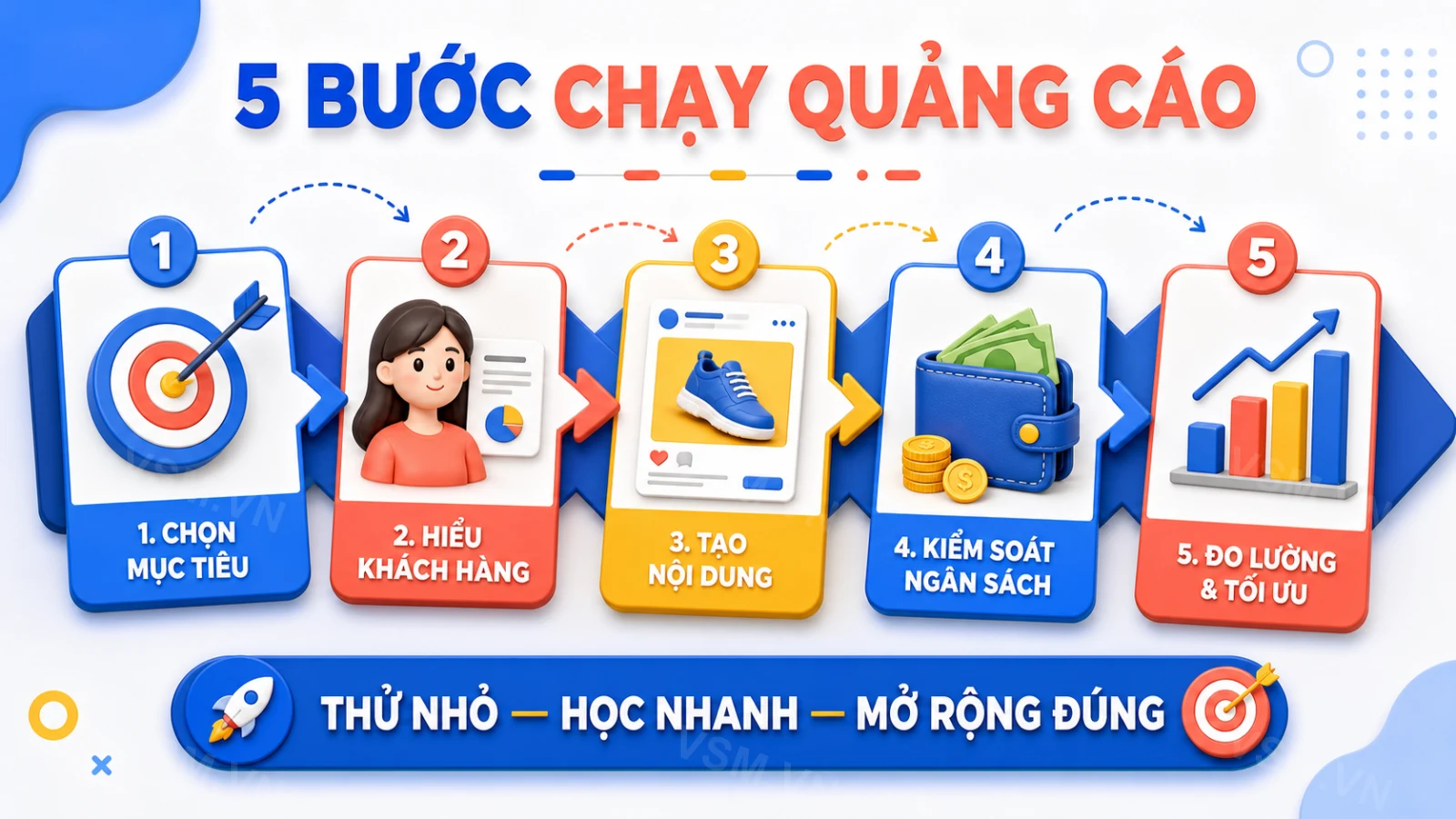
Step 1: Build a Sound Campaign Structure
A campaign should contain 2-3 ad sets with different audience segments so you can compare performance. For beginners, it's best to use CBO (Campaign Budget Optimization) so Facebook automatically allocates budget to the best-performing ad set, saving you the time of manual adjustments.
Understanding the Facebook Ads Structure
Facebook Ads are organized in a three-tiered structure:
- Campaign: This is where you set your overall objective (e.g., Conversions, Messages, Traffic). This objective dictates how Facebook optimizes your ads.
- Ad Set: Within each campaign, you define your audience (demographics, interests, behaviors, custom audiences), placements (where ads appear), budget, schedule, and optimization event (e.g., link clicks, purchases). You can have multiple ad sets within one campaign to test different audiences or strategies.
- Ad: This is the actual creative – the image, video, text, and call-to-action that users see. You can have multiple ads within an ad set to test different creatives.
Step 2: Set Up Targeting and Ad Placements
In the early stage, let Facebook use Automatic Placements, since the algorithm will find the placements (Feed, Reels, Stories, Marketplace, and more) that deliver the lowest cost. Only switch to manual placements once you have enough data to know which ones convert best for your industry.
The Nuances of Ad Placements
While Automatic Placements are excellent for beginners, understanding the different placement options can inform future optimization:
- Facebook Feeds: The most common placement, appearing as users scroll through their News Feed.
- Instagram Feeds: Similar to Facebook, but for Instagram users.
- Marketplace: Ads appear when users browse Facebook Marketplace.
- Facebook Video Feeds: Ads shown in between videos or as standalone videos in the Watch section.
- Right Column (Desktop only): Smaller ads on the side of the Facebook desktop interface. Less prominent but can be cost-effective.
- Stories (Facebook, Instagram, Messenger): Full-screen, vertical ads that appear between user stories. Highly engaging, especially for younger audiences.
- Reels (Facebook, Instagram): Short, vertical video ads integrated into Reels content.
- In-Stream Videos (Facebook): Ads that play before, during, or after video content on Facebook.
- Audience Network: Extends your reach to third-party apps and websites that partner with Facebook.
- Messenger Inbox/Stories: Ads appear in the Messenger app.
After a week or two, review your Ad Set performance and break down results by placement. You might find that Instagram Stories drive excellent engagement for your fashion brand, while Facebook Feeds are better for driving website traffic for your B2B service. This data then allows you to switch to manual placements and allocate more budget to the high-performing ones, or create specific creatives tailored for those placements.
Step 3: Design Compelling Ad Creative
The first three seconds decide whether a user stops to watch your ad or scrolls right past it. Prioritize short videos and sharp images that clearly convey the product's benefits, along with headlines that speak directly to your customers' pain points or desires. Prepare 3-5 creative variations for each campaign so you can test and cut underperforming ones early.
Elements of a High-Performing Ad Creative
- Visual Hook (Image/Video):
- Videos: Start with an attention-grabbing element in the first 1-3 seconds. This could be a surprising visual, a question, a bold statement, or a quick demonstration of a problem being solved. Keep videos concise, ideally under 30 seconds for feed placements, and design them to be understood with sound off (use captions!).
- Images: High-resolution, bright, and visually appealing. Avoid stock photos if possible; authentic images often perform better. Show the product in use, highlight its unique selling proposition, or create an aspirational scene.
- Headline: This is often the first text people read after seeing your visual. Make it concise, compelling, and relevant to your audience's pain points or desires. Use numbers, questions, or strong verbs.
- Example for a skincare product: "Tired of Acne Breakouts? Discover Our 3-Step Solution!"
- Primary Text (Ad Copy): This is the main body of your ad.
- Problem-Agitate-Solve (PAS) Framework: Start by identifying a problem your audience faces, agitate that problem (describe its impact), then present your product as the solution.
- Benefit-Oriented: Focus on what your product does for the customer, not just what it is. Instead of "Our cream has Vitamin C," say "Achieve Brighter, Even-Toned Skin with Our Vitamin C Cream."
- Call to Action (CTA): Clear, direct, and encouraging. Use phrases like "Shop Now," "Learn More," "Get Your Free Quote," "Download Now." Ensure the CTA button matches your copy.
- Emoji Use: Can break up text and add visual appeal, but use sparingly and appropriately for your brand voice.
- Social Proof: If possible, incorporate testimonials, reviews, or user-generated content into your creative. This builds trust and credibility.
Actionable Tip: Don't just create one ad. Develop 2-3 distinct creatives for each ad set. For example, one video ad, one static image ad, and one carousel ad. Test different headlines and primary texts with the same visual. This iterative testing process is crucial for finding what resonates best.
Step 4: Allocate Budget and Runtime
With a small budget, run each ad set for at least 3-4 days before deciding to pause it or increase spend, since Facebook's algorithm needs a learning phase to optimize delivery. Turning off ads too early, before they've cleared the learning phase, is a common mistake that leads people to misjudge how well a campaign is actually performing.
Understanding the Facebook Learning Phase
When you launch a new ad set or make significant edits, Facebook enters a "learning phase." During this period, the algorithm explores the best way to deliver your ads to optimize for your chosen objective. It needs about 50 optimization events (e.g., 50 purchases if your objective is purchases) to exit this phase and become stable. Until it exits, performance can be erratic, and costs might be higher. This is why patience is key.
Budgeting Strategy for Beginners:
- Start Small: As mentioned in the FAQ, $2-4 per day per ad set is a good starting point.
- Daily vs. Lifetime Budget: For beginners, a daily budget offers more control and flexibility. Lifetime budgets are better for fixed-duration campaigns.
- CBO (Campaign Budget Optimization): As recommended, CBO is excellent for beginners. Set your total daily budget at the campaign level (e.g., $10-15 for 3 ad sets), and Facebook will dynamically allocate more to the better-performing ad sets.
- Minimum Runtime: Allow at least 4-7 days for each ad set to run without major changes, especially if you're aiming for conversion events that might take longer to accumulate.
Optimizing Ads to Lower Cost and Boost Conversions
Keep a close eye on CPM (cost per 1,000 impressions), CTR (click-through rate), CPC (cost per click), and conversion rate to identify exactly where a campaign needs intervention. If CTR is low, the issue usually lies in the creative or the targeted audience. If CTR is high but conversion rate is low, check your landing page or checkout process.
- Cut ad sets with an abnormally high CPM compared to your industry benchmark as early as possible.
- Use Facebook Pixel to track customer behavior on your website and build remarketing audiences.
- Refresh your creative every 1-2 weeks to avoid "ad fatigue," which happens when the same audience sees your ad too many times.
Key Metrics and What They Tell You
- CPM (Cost Per Mille/1000 Impressions): How much it costs to show your ad 1,000 times. A high CPM can indicate intense competition for your audience or poor ad relevance. If your CPM is much higher than industry averages, consider broadening your audience slightly or improving ad relevance.
- CTR (Click-Through Rate): The percentage of people who saw your ad and clicked on it. A low CTR (e.g., below 1% for most industries) suggests your ad creative isn't compelling enough, or you're targeting the wrong audience. Test new visuals, headlines, or refine your audience.
- CPC (Cost Per Click): How much you pay for each click on your ad. High CPC with low CTR often points to poor creative or audience targeting.
- Conversion Rate: The percentage of people who clicked your ad and completed your desired action (e.g., purchase, lead form submission). If CTR is high but conversion rate is low, the problem is likely *after* the click – your landing page experience, product offering, or pricing.
- Frequency: The average number of times a person in your target audience has seen your ad. A high frequency (e.g., above 3-4 for small audiences) indicates ad fatigue.
- ROAS (Return On Ad Spend): Your total revenue from ads divided by your total ad spend. This is the ultimate measure of profitability. If your ROAS is below your break-even point, your campaigns are losing money.
Leveraging the Facebook Pixel for Advanced Optimization
The Facebook Pixel is a small piece of code you place on your website. It's indispensable for modern Facebook advertising.
- Tracking Conversions: It tells Facebook when someone takes an action on your website after seeing your ad, allowing the algorithm to optimize for those actions.
- Building Custom Audiences: You can create audiences of people who visited specific pages, added items to their cart, or made a purchase.
- Remarketing/Retargeting: Show ads specifically to people who have already interacted with your website or business. This is highly effective as these users are already familiar with your brand.
- Creating Lookalike Audiences: Use your pixel data (e.g., purchasers) as a source for creating high-value lookalike audiences.
Actionable Tip: Install the Facebook Pixel immediately, even if you're not running conversion campaigns yet. It will start collecting valuable data that you can use later. Verify that standard events (Page View, View Content, Add to Cart, Purchase) are firing correctly using the Facebook Pixel Helper browser extension.
Combating Ad Fatigue with Creative Refresh and Audience Segmentation
Ad fatigue happens when your audience sees the same ad too many times, leading to decreased engagement, higher costs, and lower conversion rates.
- Creative Rotation: Refresh your ad creatives every 1-2 weeks. This doesn't mean entirely new campaigns; it can be new images, videos, headlines, or primary texts.
- Vary Your Message: Don't just change the visual; change the angle. Highlight a different benefit, address a new pain point, or tell a different story.
- Audience Segmentation: If your audience is small, break it into smaller segments and rotate different ads to each segment. This naturally reduces frequency for any single ad.
- Exclusion Targeting: Exclude people who have already converted (e.g., made a purchase) from seeing conversion-focused ads. Instead, show them a loyalty offer or a complementary product.
Common Mistakes When You're New to Facebook Ads
Many beginners rush to raise their budget after seeing a few initial orders without confirming the campaign has actually stabilized, causing costs to spike without a matching return. Another common mistake is skipping a quality check on the Fanpage before running ads: a brand-new page with little engagement and a bare-bones profile picture will make viewers question its credibility no matter how good the ad creative is.
That's why, before pouring budget into paid ads, it's worth investing in a solid Fanpage foundation with a genuine base of followers and organic engagement. You can check out our guide on how to increase Facebook followers fast and effectively to build a credible fanpage before you start advertising, which helps raise your conversion rate and lower ad costs down the road.
Other Pitfalls to Avoid:
- Ignoring Negative Comments: Unanswered negative comments can quickly erode trust. Monitor your ad comments and respond professionally and promptly. Sometimes, negative feedback can even provide valuable insights.
- Lack of A/B Testing: Never assume you know what will work best. Always test different audiences, creatives, and even objectives. Run experiments to gather data and make informed decisions.
- Sending Traffic to a Poor Landing Page: Even the best ad creative will fail if the landing page is slow, confusing, not mobile-friendly, or irrelevant to the ad's promise. Ensure your landing page is optimized for conversions.
- Not Installing the Facebook Pixel: As mentioned, this is a fundamental error that limits your ability to track, optimize, and retarget effectively.
- Over-Optimizing Too Early: Constantly pausing and restarting ad sets, or making drastic changes during the learning phase, prevents Facebook's algorithm from optimizing effectively. Make changes in small, incremental steps.
- Disregarding Ad Policy: Facebook has strict advertising policies. Violations can lead to ad rejections, account restrictions, or even permanent bans. Always review policies related to prohibited content, restricted content (e.g., alcohol, dating, financial services), and community standards.
Building a Credible Facebook Fanpage: The Pre-Ad Checklist
Your Fanpage is your storefront on Facebook. Before running ads, ensure it looks professional and trustworthy:
- Complete Profile: Fill out all sections: About Us, contact info, business hours, services, privacy policy, and an engaging story.
- High-Quality Profile Picture & Cover Photo: Use your brand logo and an attractive cover photo that reflects your brand identity.
- Consistent Organic Content: Post regularly (2-3 times a week) with valuable content that resonates with your audience. This shows activity and relevance.
- Engagement: Respond to comments and messages promptly. Encourage interaction. A page with zero comments or replies looks abandoned.
- Positive Reviews: Encourage satisfied customers to leave reviews. Positive social proof is invaluable.
- Initial Follower Base: While not strictly necessary, having a few hundred genuine followers (from inviting friends, organic growth) makes your page look more established than starting from zero.
A strong Fanpage acts as a social proof multiplier. When users see your ad, they often click on your page to check credibility before clicking through to your website or messaging you. A well-maintained page reinforces trust and makes your ads more effective.
When to Bring In a Professional Agency for Your Ads
If you've tried running ads yourself but costs remain high while orders aren't growing, or you simply don't have time to monitor and optimize daily, partnering with an experienced agency can shorten the trial-and-error phase considerably. A campaign set up correctly from the start, combining precise targeting with creative tailored to local user behavior, typically delivers far more stable results than figuring it out alone. If you need an all-in-one solution covering strategy, creative design, and daily budget optimization, VSM's comprehensive Facebook advertising service can help you launch a well-structured campaign, save time, and reduce the risk of burning budget on underperforming campaigns.
Benefits of Partnering with a Facebook Ads Agency
- Expertise and Experience: Agencies have dedicated teams that live and breathe Facebook Ads. They stay updated on algorithm changes, new features, and best practices. They've likely managed campaigns across various industries, giving them insights into what works and what doesn't.
- Time Savings: Running effective Facebook Ads is a full-time job. Agencies handle everything from strategy and creative development to daily monitoring, optimization, and reporting, freeing up your time to focus on core business operations.
- Strategic Planning: Beyond just setting up ads, agencies develop comprehensive strategies aligned with your business goals, target audience, and market conditions. This includes funnel mapping, budget allocation across different campaign stages, and long-term scaling plans.
- Access to Advanced Tools and Techniques: Agencies often use premium tools for audience research, competitor analysis, creative testing, and reporting that might be too expensive or complex for individual businesses. They also employ advanced techniques like sophisticated retargeting funnels and custom audience segmentation.
- A/B Testing and Optimization: They have structured processes for continuous A/B testing of creatives, audiences, and bids, ensuring campaigns are always being optimized for the best possible performance. Their data-driven approach minimizes guesswork.
- Compliance and Policy Adherence: Navigating Facebook's ever-changing ad policies can be tricky. Agencies are well-versed in these rules, reducing the risk of ad rejections or account suspensions.
- Scalability: When a campaign is performing well, agencies know how to scale it effectively without dramatically increasing costs or diluting performance, which is a common challenge for beginners.
- Detailed Reporting and Insights: You'll receive clear, actionable reports that explain campaign performance, key metrics, and strategic recommendations, helping you understand your ROI.
While the initial cost of an agency might seem higher than doing it yourself, the saved time, reduced wasted ad spend, and potentially higher ROI often make it a worthwhile investment for businesses looking to grow seriously on Facebook.
Frequently Asked Questions
How much budget should I start with when running Facebook Ads? Beginners should start with roughly $2-4 (about VND 50,000-100,000) per day for each ad set, which is enough to generate learning data without risking too much. You can then scale up once you've identified the audience and creative that perform best.
How long should I run an ad before knowing if the campaign is working? It typically takes at least 3-4 days for a campaign to clear the algorithm's learning phase, after which you should track it for another 5-7 days to objectively assess the trend in your metrics before deciding to pause or scale it.
Why does Facebook reject ads during review? The most common reasons are content that violates ad policy, such as excessively exaggerated claims or inappropriate before-and-after imagery, or a landing page that doesn't meet Facebook's standards for contact information and privacy policy. Read Facebook's advertising policies carefully before you submit.
Should I run Facebook Ads alongside organic content optimization? Yes. Paid ads deliver fast reach, while consistent organic content and engagement build long-term trust with customers and help the algorithm view your fanpage more favorably, indirectly lowering your ad costs.
What is the difference between reach and impressions? Reach is the number of unique people who saw your ad, while impressions are the total number of times your ad was displayed (a single person might see your ad multiple times, contributing to higher impressions than reach). Reach focuses on unique viewers, impressions on total views.
How often should I check my Facebook Ad performance? For campaigns in the learning phase or with small budgets, check every 1-2 days. Once campaigns are stable and scaling, a daily or every-other-day check is sufficient to catch any major performance shifts. Detailed weekly reviews are essential for strategic adjustments.