
How to Recover a Locked Facebook Account or Fanpage
Vietnamese
Quick answer: To recover a locked Facebook account or Fanpage, start by visiting the Facebook Help Center and selecting "Report a Problem." You'll likely need to provide an email or phone number associated with the account, along with a government-issued ID like a passport or driver's license. Facebook typically reviews these requests within 24-48 hours. Be prepared to provide additional details about how the account was locked.
Suddenly seeing the message "your account has been disabled" on Facebook, or watching your fanpage vanish from your control overnight, is every online seller's and personal brand builder's nightmare. This guide walks you through how to recover a locked Facebook account or page, from correctly identifying the cause to following Meta's official recovery process, plus the key precautions that will help you avoid running into the same problem again.
Whether you manage a personal profile you've built over years or a business fanpage with tens of thousands of followers, losing access overnight costs you time, data, and often revenue. Many people panic and take the wrong steps, which only makes the account look riskier to Meta's systems and drags out the review process even longer. Understanding the correct recovery procedure and knowing how to present your appeal properly will get your account back faster, while also lowering the risk of a permanent ban.
Why Do Personal Facebook Accounts Get Locked?
Facebook runs an automated detection system alongside human moderators to catch unusual behavior and protect the overall community experience. When the algorithm suspects a violation, it places the account into a "checkpoint" (identity verification required) state or disables it outright. The most common triggers include:
- Logging in from multiple devices, IP addresses, or countries within a short span of time, which makes the system suspect the account has been compromised.
- Using automation tools (bots) to mass-like, follow, add friends, or send messages and comments at an abnormal frequency.
- Violating Community Standards: posting violent or sensitive content, spreading misinformation, or being reported by many other users at once.
- Using a fake name or personal information that doesn't match your ID documents when Facebook requests identity verification.
- Having your password leaked through reuse on another service, letting a hacker take over the account and change the login credentials.
Common Scenarios for Personal Account Locks
Let's dive deeper into some specific situations that often lead to a locked personal account:
- The "Traveler's Trap": You're on vacation, logging in from a new country using public Wi-Fi, and then from your mobile data. This combination of new IP addresses and devices can easily trigger a security alert, especially if you're also accessing your account more frequently than usual to share updates.
- Aggressive Friend Requests/Messages: If you're trying to quickly grow a network for a new venture and send out dozens of friend requests or messages in a short period, Facebook's systems might flag this as spamming or bot-like behavior.
- Reusing Passwords: A common mistake. If you use the same password for your Facebook account as you do for a less secure forum or website, and that site suffers a data breach, your Facebook login credentials can become compromised. Hackers might then try to log in, triggering Facebook's security.
- "Clickbait" or Misinformation Sharing: Even if you don't create the content, sharing posts that Facebook's fact-checkers identify as misinformation, or content that contains graphic violence or hate speech, can lead to your account being restricted or locked.
- Profile Name Discrepancy: If you've been using a nickname or a professional alias on Facebook for years, and then Facebook requests identity verification, a mismatch with your official government ID (passport, driver's license) can cause a persistent lock until resolved.
Why Do Facebook Pages Get Locked or Lose Admin Access?
Beyond the personal-account causes listed above, fanpages carry extra risk tied specifically to advertising activity and business page operations:
- Running ads that violate Meta's policies (prohibited goods, sensitive content, misleading claims), which can restrict or lock both the ad account and the linked page.
- The page's sole admin has their personal account locked, leaving the fanpage without a valid administrator.
- Being mass-reported by competitors, or flagged for infringing on a third party's copyrighted images, audio, or brand logo.
- Changing the page's name, category, or contact information too many times in a short period, which reads as suspicious activity to the review system.
- A sudden, abnormal spike in follower growth or engagement compared to the page's historical pattern, which can flag it for suspected manipulation.
Specific Page Violation Examples
For business pages, the stakes are higher, and the reasons for a lock can be more nuanced:
- Ad Policy Violations:
- Prohibited Content: Running ads for anything considered illegal, unsafe supplements, or adult products. Example: An ad promoting a "miracle weight loss pill" with unverified claims and before-and-after photos.
- Misleading Claims: Ads that promise unrealistic results or use deceptive tactics. Example: An ad for a financial service promising "guaranteed returns of 500% in a week."
- Circumventing Systems: Trying to hide the true destination of a link, using cloaking, or other tactics to bypass ad review.
- Intellectual Property Infringement:
- Using copyrighted music in a video without permission.
- Posting images or logos that belong to another brand without proper licensing.
- Selling counterfeit goods or products that infringe on trademarks.
- Inactivity or Suspicious Activity:
- A page that has been dormant for a long time suddenly becomes very active, posting frequently and running ads. This can look like a compromised account.
- Rapid changes in page roles, especially removing all existing admins and adding new, unfamiliar ones.
- Community Standards for Pages: Pages are also subject to the same Community Standards as personal profiles. If a page's content consistently promotes hate speech, violence, or false information, it will be penalized.
Steps to Recover a Locked Personal Facebook Account
Once you discover your account has been locked, follow this sequence to maximize your chances of a fast recovery:
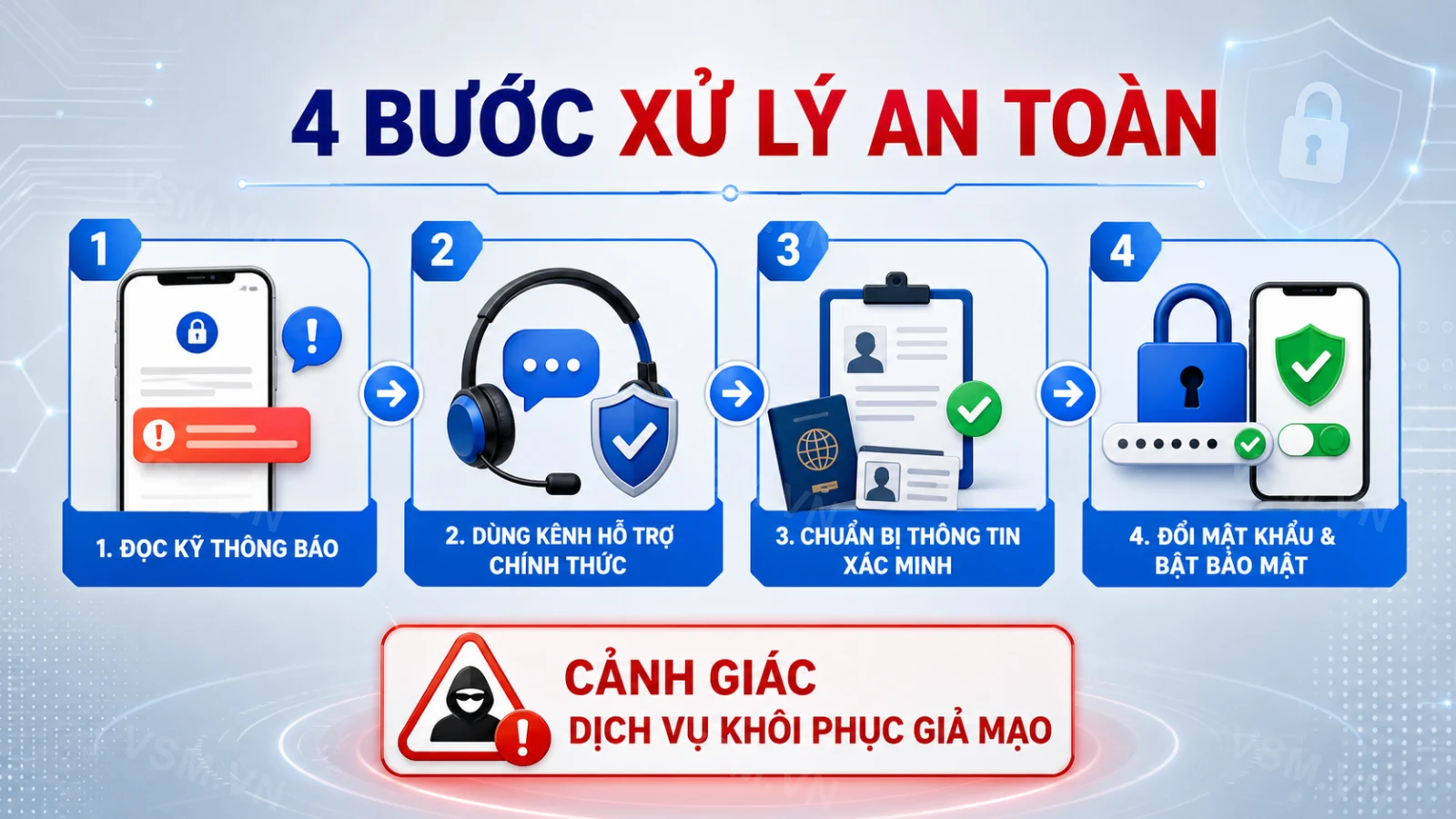
- Step 1 - Read the lock notice carefully: Facebook usually states the reason (Community Standards violation, suspected impersonation, unusual login activity...). Identifying the correct cause helps you pick the right appeal form.
- Step 2 - Go to the official Help Center: Visit facebook.com/help or the appeal link included in the lock notice. Never click links from unsolicited emails, messages, or texts claiming to be "Facebook Support."
- Step 3 - Verify your identity: Have a clear photo of a valid national ID or passport ready; the name on the document must match the name displayed on your account.
- Step 4 - Wait for review and monitor your email: Response times range from a few hours to several days depending on the severity of the violation. Avoid creating a new account or submitting duplicate appeals, as this can get your case flagged as spam.
- Step 5 - Change your password and enable two-factor authentication: As soon as access is restored, switch to a strong password and turn on two-factor authentication (2FA) to prevent the issue from recurring.
Detailed Breakdown of Personal Account Recovery Steps
Let's elaborate on each step to ensure you're fully prepared:
- Understand the Lock Notice:
- "Account Disabled": Often indicates a serious violation of Community Standards.
- "Account Locked": Usually for suspicious activity, requiring identity verification.
- "Account Compromised": Indicates a potential hack, prompting password reset and security checks.
- The message will often provide a direct link to the appeal form or a relevant Help Center article. Prioritize using this link.
- Accessing the Official Help Center:
- If you can't access your account, try to access Facebook's Help Center directly from another device or browser: Facebook Disabled Account Appeal or Facebook Hacked Account Appeal.
- Crucial Warning: Phishing scams are rampant. Always double-check the URL to ensure it's "facebook.com" and not a variation like "faceb00k.com" or "facebook-support.com."
- Identity Verification Best Practices:
- Accepted IDs: Government-issued photo IDs like a driver's license, passport, national ID card. Some countries accept other forms like birth certificates or utility bills, but photo IDs are preferred.
- Photo Quality: Ensure the image is clear, well-lit, and all details (name, photo, date of birth) are legible. No glare, shadows, or cropped edges.
- Matching Information: The name and date of birth on your ID must exactly match what's on your Facebook profile. If you used a different name, you might need to explain this in the appeal or provide additional documentation.
- The Waiting Game:
- Patience is Key: Submitting multiple appeals for the same issue can actually delay the process. Meta's systems might interpret it as spam or an attempt to overload their review process.
- Check Spam Folder: Facebook's replies sometimes land in spam or junk folders, so monitor all email folders associated with your account.
- No New Accounts: Do not create a new Facebook account while your primary one is under review. This can be seen as an attempt to circumvent a ban and might lead to the new account being disabled as well.
- Post-Recovery Security Measures:
- Strong Password: Use a unique, complex password (mix of uppercase, lowercase, numbers, symbols, at least 12 characters). Consider a password manager.
- Two-Factor Authentication (2FA): Enable 2FA using an authenticator app (like Google Authenticator or Authy) or a physical security key, as SMS-based 2FA can be less secure due to SIM swap attacks. Go to Settings & Privacy > Settings > Security and Login > Use two-factor authentication.
- Review App Permissions: Go to Settings & Privacy > Settings > Apps and Websites and remove any apps you don't recognize or no longer use. These could be potential security vulnerabilities.
- Review "Where You're Logged In": Log out of all unfamiliar devices and locations.
How to Recover a Locked Facebook Page or Restore Lost Admin Access
A fanpage is tightly linked to its administrator's personal account, so the recovery process differs slightly from that of a standalone personal profile:
- If the page is restricted because the admin's personal account was locked, first recover the personal account using the steps above; the page will typically become accessible again automatically.
- If the page is restricted due to an advertising policy violation, check the Account Quality section in Meta Business Suite for violation details and submit an appeal through the correct category.
- If you've lost all admin access entirely, Facebook has a dedicated form for pages with no active administrator, which requires proof of brand ownership such as a business license, official website, or past ad invoices.
- For high-value pages that are running ads or have a substantial follower base, it's worth keeping two to three backup admin accounts on hand to reduce the risk of losing control entirely if one account runs into trouble.
Advanced Page Recovery Strategies
Recovering a business page often requires a more strategic approach due to its commercial implications:
- Admin Account Recovery First: This is paramount. If the personal profile of the sole admin is locked, the page becomes inaccessible. Focus all efforts on recovering that personal account. Once it's back, the page should follow.
- Navigating Meta Business Suite for Ad Violations:
- Go to Meta Account Quality. This dashboard is your central hub for all ad account, page, and Business Manager issues.
- Look for specific alerts related to your page or ad account. Facebook will usually provide a detailed reason for the violation and a direct link to appeal.
- Crafting Your Appeal: Be concise, polite, and provide any evidence requested. If you believe it was a mistake, clearly state why. If you acknowledge a mistake, explain what steps you've taken to rectify it (e.g., deleted the offending ad, revised targeting).
- Lost All Admin Access:
- If you are the rightful owner but have completely lost admin access, visit the Facebook Page Ownership Dispute Form.
- Proof of Ownership: This is critical. You'll need documents like:
- Business registration documents or license.
- Utility bills in the business name.
- Domain registration for your official website.
- Screenshots of past ad invoices showing your business name.
- A signed statement on company letterhead confirming your role.
- The more compelling and official your proof, the higher your chances of success.
- The Backup Admin Strategy:
- Why it's Crucial: Having multiple admins ensures that if one account is locked, others can still manage the page.
- Who to Add: Ideally, add trusted colleagues, business partners, or even a secondary personal account you own that is rarely used for other activities and has strong security.
- Role Management: Assign the lowest necessary role. Not everyone needs to be a full "Admin." Editors, Moderators, or Advertisers might suffice for specific tasks, limiting potential damage if their account is compromised. Regularly review Page Roles.
- Engaging with Facebook's Support (if available): For larger businesses with ad spend, you might have access to a dedicated Facebook marketing expert or chat support through your Business Manager. Leverage these resources if they are available to you, as they can sometimes expedite the review process.
While waiting for recovery, if you need to rebuild your page's credibility and engagement after an incident, pairing the process with a professional Facebook growth service can help your page's engagement metrics bounce back faster than relying on organic growth alone.
Safety Tips to Prevent Your Account and Page From Being Locked Again
Prevention always beats damage control - here are the principles that keep your account and page safe over the long run:
- Never log into Facebook through unfamiliar apps or websites that request access to your personal data or admin rights over your page.
- Avoid using low-quality tools to fake likes or followers from unreliable sources, as this easily gets an account flagged as spam; for genuine growth, look into effective, fast ways to grow Facebook followers the sustainable way, in line with the platform's policies.
- Always enable two-factor authentication (2FA) on both your personal account and Business Manager, and never share your OTP codes or password with anyone.
- Regularly check the "Where You're Logged In" section to spot unfamiliar devices early and log out of any sessions you don't recognize.
- Keep at least one verified backup email and phone number ready for when your primary account runs into trouble.
- Follow Meta's Community Standards and advertising policies, and steer clear of sensitive or unnecessarily controversial content.
Proactive Security Measures and Best Practices
Beyond the basics, here's how to build a robust defense for your Facebook presence:
- Regular Security Check-ups:
- Facebook Security Checkup: Periodically use Facebook's built-in Security Checkup tool. It guides you through reviewing recent logins, password strength, and enabling 2FA.
- Review App Permissions: Annually, go through Settings & Privacy > Settings > Apps and Websites. Remove any apps you no longer use or don't recognize. These apps can be a backdoor for hackers if compromised.
- Strong Password Hygiene:
- Unique Passwords: Never reuse passwords across different platforms. If one service is breached, your other accounts remain safe.
- Password Manager: Utilize a reputable password manager (e.g., LastPass, 1Password, Bitwarden) to generate and store complex, unique passwords for all your accounts.
- Two-Factor Authentication (2FA) Deep Dive:
- Authenticator Apps: Prioritize authenticator apps (Google Authenticator, Authy, Microsoft Authenticator) over SMS for 2FA. SMS can be vulnerable to SIM swap attacks.
- Backup Codes: Generate and safely store Facebook's backup codes. These are crucial if you lose access to your 2FA device. Store them offline or in an encrypted password manager.
- Business Manager 2FA: Ensure 2FA is mandatory for all users in your Meta Business Manager. This adds an extra layer of security for your business assets.
- Monitoring Login Activity:
- "Where You're Logged In": This section (Settings & Privacy > Settings > Security and Login) is your first line of defense against unauthorized access. If you see an unfamiliar device or location, log it out immediately and change your password.
- Login Alerts: Enable login alerts via email and push notifications. This way, you're immediately notified of any new logins to your account.
- Diversifying Admin Roles (for Pages):
- As mentioned, have at least 2-3 trusted admins.
- Consider different levels of access. Not every team member needs full admin rights. Use roles like Editor, Moderator, or Advertiser to limit exposure.
- Regularly audit your page roles to ensure only active, authorized individuals have access.
- Content and Ad Policy Compliance:
- Stay Updated: Meta's policies (Community Standards, Advertising Policies) evolve. Regularly review them to ensure your content and ads remain compliant.
- Review Before Posting: Before publishing any content or launching an ad, take a moment to consider if it could be perceived as sensitive, misleading, or violating any rules.
- Legal Advice: If you're in a highly regulated industry (e.g., finance, health, gambling), consider seeking legal counsel to ensure your marketing complies with both Meta's rules and local laws.
- Backup Information:
- Up-to-Date Contact Info: Ensure your primary email, backup email, and phone number on Facebook are current and accessible.
- Trusted Contacts: Consider setting up Facebook's "Trusted Contacts" feature. These are friends who can help you regain access if you're locked out.
DIY Recovery or Professional Support?
For a personal account with a minor lock, such as a routine identity-verification checkpoint, you can usually resolve it yourself within a few days by following the steps above. However, for a high-value business page running multiple ad campaigns, or one locked due to mass reporting by competitors, submitting repeated appeals the wrong way can get your case flagged as "appeal spam," dragging out the review process and lowering your odds of a successful recovery. In situations this complex, working with a team experienced in resolving Facebook account and page incidents, one that understands Meta's verification process and policies inside out, can shorten your recovery time while also advising you on how to lock down security to prevent the issue from happening again.
When to Consider Professional Assistance
Deciding when to seek professional help can save significant time, stress, and potential revenue loss. Here are scenarios where expert intervention is highly recommended:
- High-Value Business Pages: If your Facebook page is critical for your business operations, revenue generation, or brand reputation, every hour it's down costs you. Professionals can prioritize and navigate the recovery process more efficiently.
- Complex Violations: If the lock notice is vague, or if you've been flagged for "circumventing systems," "inauthentic behavior," or "IP infringement," these often require a deeper understanding of Meta's internal workings to appeal effectively.
- Repeated Denials: If your initial appeals have been denied, and you're unsure why or what new information to provide, a professional can offer a fresh perspective and help structure a more compelling case.
- Mass Reporting or Malicious Attacks: If you suspect your page or account has been targeted by competitors or malicious actors, proving this to Facebook can be challenging. Experts can help gather evidence and present it in a way Meta understands.
- Lost All Admin Access with No Backup: This is one of the most dire situations for a page. If you lack the necessary documentation or are unsure how to present it, a professional service can guide you through the ownership verification process.
- Time Sensitivity: For campaigns, product launches, or seasonal sales, immediate recovery is paramount. Professionals often have established channels or methods that can expedite the process beyond standard user support.
- Lack of Internal Expertise: If you or your team lack the specific knowledge of Facebook's policies, appeal processes, or the time to dedicate to a lengthy recovery, outsourcing to specialists can be a wise investment.
A professional service doesn't just help with recovery; they often provide valuable insights into preventing future incidents, strengthening your overall social media security posture, and optimizing your approach to Meta's policies.
Frequently Asked Questions
How long does it take to recover a locked Facebook account? Processing time depends on the severity of the violation and the current volume of appeals Facebook is handling, typically ranging from a few hours to 3-7 days; cases requiring additional document verification can take longer.
Can a permanently banned account be recovered? If Facebook determines the violation was serious enough to warrant a permanent ban, the chances of recovery are very low; you can still submit a final appeal through the official form along with valid proof of identity.
What happens if a page has no admin left at all? Facebook has a dedicated form for pages that have lost all administrative access, requiring proof of brand ownership such as a business license, an official website, or past advertising invoices.
Should I buy back a locked account or page from a third party? No, buying and selling accounts violates Meta's Terms of Service and carries the risk of the account being locked again or getting caught up in legal disputes down the line.
Can I create a new Facebook account if my old one is locked? It is strongly advised against creating a new account while your existing one is under review or permanently banned, as this can be seen as an attempt to circumvent a ban and may lead to the new account also being disabled.
What if my ID doesn't match the name on my profile exactly? For minor discrepancies (e.g., middle name missing on profile), you might need to explain this in your appeal. For significant differences (e.g., using a business name instead of your legal name), Facebook may require additional documentation or you might need to update your profile name to match your ID.