
Top Free SEO Tools to Analyze and Rank on Google
Vietnamese
Quick answer: Many free SEO tools help analyze and rank on Google, with Ubersuggest offering 3 free searches daily for keyword research and competitive analysis. Google Analytics provides crucial website traffic insights, while Google Search Console helps identify indexing issues and optimize for organic search. Even without paid subscriptions, leveraging these tools consistently can significantly improve your site's visibility and search performance over time.
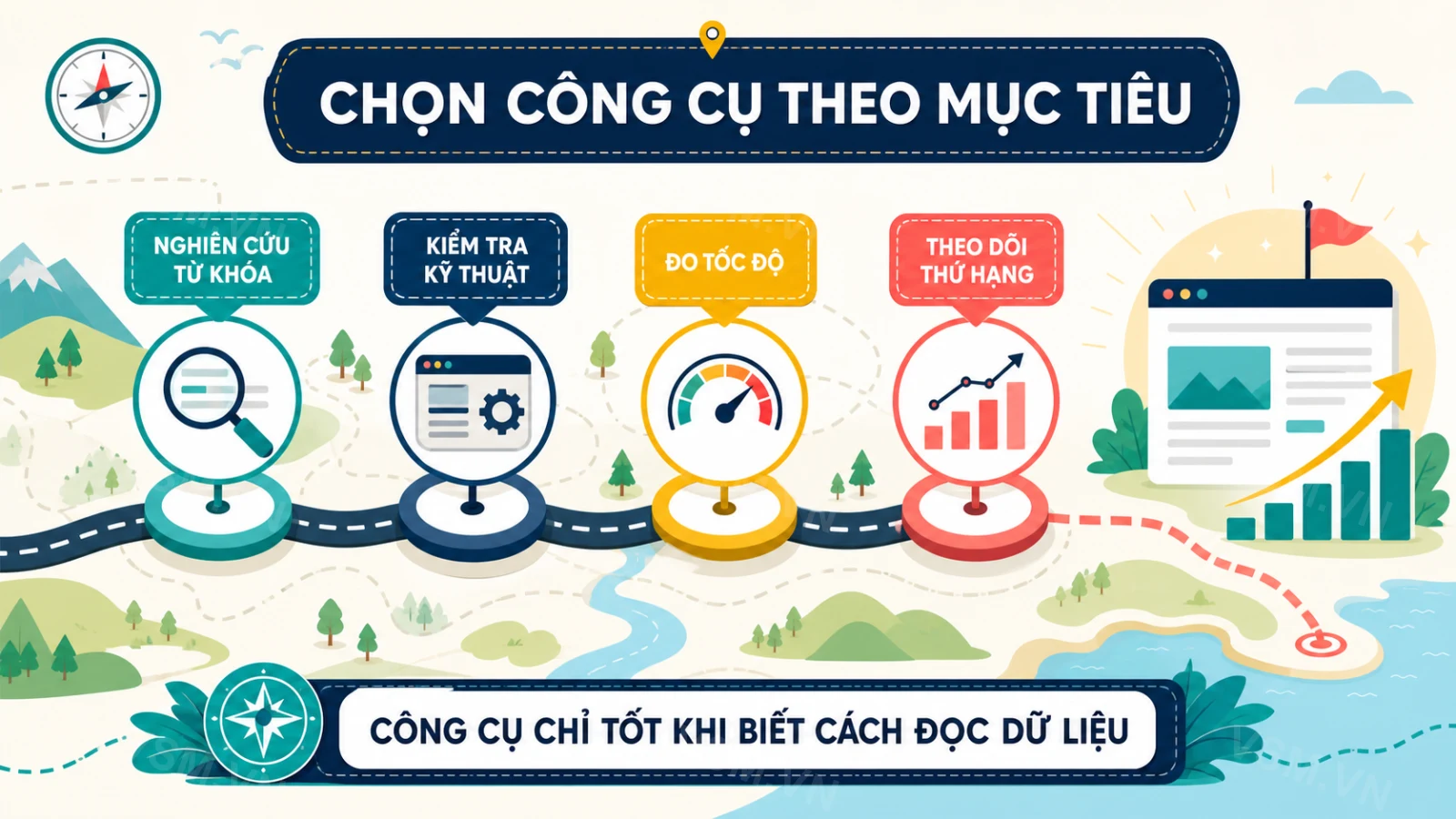
If you are doing SEO yourself but have a limited budget, the good news is that there are many free SEO tools available online that are strong enough to help with keyword research, technical checks, rank tracking, and backlink analysis, all without any licensing fees. The challenge is not the lack of tools, but knowing how to choose the right tool for the right purpose and understanding the data to take action rather than just looking at reports for fun.
This article compiles the most reliable free SEO tools available today, categorized by specific functions: keyword research, on-page optimization, rank tracking, backlink checking, and technical audits. After reading, you'll have a complete set of tools to assess your website's SEO health and know when to invest further.
Why Use Free SEO Tools Before Paying
SEO is a long process involving many tasks from technical, content, to link building. If you're just starting to explore comprehensive SEO and what an SEO professional needs to do, trying out free tools first will help you better understand the actual process: measuring, identifying issues, providing solutions, and then measuring again. Once you're familiar with reading data, you'll know which paid tools are really worth investing in and which ones only duplicate features.
Another reason: most free tools come directly from Google, so the data reflects the closest way search engines perceive your website, rather than just estimates from third parties.
Understanding the SEO Workflow with Free Tools
Before committing to expensive subscriptions, free tools allow you to simulate the SEO workflow. For instance, you can use Google Keyword Planner to find potential keywords, Google Search Console to see if your pages are ranking for them, and PageSpeed Insights to ensure those pages load quickly. This hands-on experience demystifies SEO, making you a more informed consumer when evaluating paid services or tools.
Cost-Benefit Analysis for Small Businesses and Startups
For small businesses or startups with tight marketing budgets, free SEO tools are invaluable. They provide essential insights without upfront investment, allowing resources to be allocated elsewhere, like content creation or targeted advertising. As the business grows and SEO needs become more complex, the insights gained from free tools will inform strategic decisions about which paid tools offer the best return on investment.
Free Keyword Research Tools
Keyword research is the cornerstone of any successful SEO strategy. It helps you understand what your target audience is searching for, the language they use, and the level of competition for those terms. Free tools provide a solid starting point for this crucial task.
Google Keyword Planner
This is a foundational tool for anyone doing SEO or running ads. Google Keyword Planner shows average monthly search volume, competition level, and related keywords to the topic you enter. Although volume data sometimes displays in ranges if the account doesn't run ads regularly, it's still the most reliable reference source as it comes directly from Google's search system.
How to Use Google Keyword Planner Effectively
- Discover New Keywords: Start with broad terms related to your business. The tool will suggest hundreds of related keywords, long-tail variations, and questions people ask.
- Analyze Search Volume: Pay attention to the average monthly searches. While exact numbers might be hidden for non-advertisers, the ranges are still highly indicative.
- Assess Competition: The "Competition" column refers to advertiser competition, but it often correlates with organic search competition. High competition usually means more established players are targeting that keyword.
- Plan Content Clusters: Group related keywords to create comprehensive content that covers a topic in depth, rather than just targeting single keywords.
Google Trends
Google Trends lets you see search trends over time, by region, and compare multiple keywords at once. This tool is particularly useful when you need to determine the timing for seasonal content or check if a keyword is growing or has saturated before investing in writing in-depth articles.
Practical Applications of Google Trends
- Identify Seasonal Peaks: If you sell winter coats, Google Trends will show you when interest in "winter coats" starts to rise and fall, allowing you to time your content and promotions perfectly.
- Spot Emerging Trends: Monitor new and upcoming topics in your industry. Being an early adopter of content around a rising trend can give you a significant competitive advantage.
- Compare Keyword Popularity: If you're debating between "eco-friendly products" and "sustainable goods," Google Trends can show you which term has more search interest in your target region.
- Local SEO Insights: See which regions have the highest interest in your products or services, helping you tailor local marketing efforts.
AnswerThePublic (Free Version)
This tool visualizes real questions users type into Google around a root keyword, in the form of questions, prepositions, comparisons. It's a great source of ideas for building FAQs or H2/H3 sections that align with actual search intent, rather than guessing what readers want to know.
Leveraging AnswerThePublic for Content Creation
- Generate Blog Post Ideas: Each question or preposition presented by AnswerThePublic is a potential blog post title or a section within a larger article.
- Optimize for Featured Snippets: By directly answering common questions, you increase your chances of appearing in Google's "People Also Ask" section or securing a featured snippet.
- Understand User Intent: The way people phrase their questions reveals their underlying needs and problems, allowing you to create more relevant and helpful content.
- Create Comprehensive Guides: Combine various questions and comparisons to build exhaustive guides that leave no stone unturned on a given topic.
Google Autocomplete and Related Searches
While not a dedicated tool, Google's autocomplete feature (the suggestions that appear as you type in the search bar) and the "Related searches" at the bottom of the SERP are goldmines for keyword ideas. These are real queries people are typing, offering immediate insights into user intent and popular variations.
Tips for Using Autocomplete and Related Searches
- Start Typing Broad Terms: Begin with a general keyword and observe the suggestions. These often reveal long-tail keywords you might not have considered.
- Use Different Modifiers: Add prefixes like "how to," "best," "what is," "reviews," etc., to your main keyword to uncover specific user needs.
- Analyze "People Also Ask": This section within the SERP directly addresses common questions, providing excellent content opportunities.
- Explore Related Searches: The terms listed at the bottom of the search results page indicate other queries users often make after searching for your initial keyword, helping you broaden your content strategy.
On-Page and Technical SEO Check Tools
On-page and technical SEO ensure your website is crawlable, indexable, and provides a good user experience. These factors are critical for search engines to understand and rank your content effectively.
Google Search Console
If you could only choose one free SEO tool, Google Search Console (GSC) would undoubtedly be the top choice. This tool shows how your website is indexed, which pages have errors, which keywords are bringing clicks, average CTR per page, and mobile experience errors. Regularly monitoring GSC weekly helps you identify technical issues early before they significantly impact your rankings.
Key Features and Actionable Insights from GSC
- Performance Report: See which queries bring traffic, your average position, CTR, and impressions. Use this to identify pages that need optimization or new keyword opportunities.
- Index Coverage Report: Monitor which pages are indexed and identify errors preventing pages from being indexed. Crucial for ensuring all your content is visible to Google.
- Sitemaps: Submit your XML sitemap to help Google discover all your important pages.
- Core Web Vitals Report: Get real-world data on your page experience metrics (LCP, FID, CLS) and identify pages that need performance improvements.
- Mobile Usability: Detect issues that make your site difficult to use on mobile devices, which can impact mobile rankings.
- Manual Actions: Be alerted if Google has issued a penalty against your site.
- Removals: Temporarily block pages from appearing in search results if needed.
Google PageSpeed Insights
Page load speed is a crucial ranking factor, especially after Google incorporated Core Web Vitals into its user experience evaluation algorithm. PageSpeed Insights scores performance on both desktop and mobile, and lists specific factors slowing down the page: uncompressed images, render-blocking JavaScript, slow-loading fonts... along with fairly detailed suggestions for improvement.
Interpreting and Acting on PageSpeed Insights Reports
- Understand Your Scores: Aim for green scores (90-100) for both mobile and desktop. Yellow (50-89) indicates room for improvement, and red (0-49) signals urgent issues.
- Focus on Core Web Vitals: Prioritize improving Largest Contentful Paint (LCP), First Input Delay (FID), and Cumulative Layout Shift (CLS), as these directly impact user experience and ranking.
- Address Specific Recommendations: PageSpeed Insights provides detailed suggestions like "Eliminate render-blocking resources," "Serve images in next-gen formats," or "Reduce server response times." Work with your web developer to implement these.
- Prioritize Critical Pages: Start by optimizing your most important pages (homepage, top landing pages, high-traffic content) as these will have the biggest impact.
Screaming Frog SEO Spider (Free Version)
The free version of Screaming Frog allows crawling up to 500 URLs, enough for small to medium websites. This tool scans the entire website structure to detect 404 errors, broken internal links, duplicate or missing title/meta description tags, unnecessary redirect chains — technical issues that silently undermine SEO effectiveness if not addressed.
Common Issues Screaming Frog Helps Uncover
- Broken Links (4xx Errors): Identify internal and external links that lead to nowhere, fixing these improves user experience and crawlability.
- Missing or Duplicate Meta Data: Find pages with missing or identical title tags and meta descriptions, which can confuse search engines and dilute SEO efforts.
- Long Title Tags/Meta Descriptions: Ensure your meta data fits within Google's display limits to avoid truncation in SERPs.
- Redirect Chains: Detect multiple redirects that slow down page loading and waste crawl budget.
- Orphan Pages: Find pages that are not linked internally, making them difficult for search engines and users to discover.
- Image Issues: Identify missing alt text or excessively large image files.
Schema.org Markup Validator
Schema markup helps search engines understand the content on your pages more deeply, leading to rich results (e.g., star ratings, recipes, events) in the SERPs. The Schema.org Markup Validator (formerly Google's Structured Data Testing Tool) allows you to test your structured data implementation for errors.
Implementing and Validating Schema Markup
- Choose Relevant Schema Types: Depending on your content (e.g., Article, Product, Review, LocalBusiness), select the appropriate schema.org type.
- Generate Markup: Use online schema generators or manually add JSON-LD to your pages.
- Test with the Validator: Paste your URL or code snippet into the Schema.org Markup Validator to check for syntax errors and ensure it's correctly interpreted.
- Monitor in GSC: Google Search Console also has dedicated reports for specific rich results (e.g., Products, Reviews), showing any errors or warnings.
Rank Tracking and Competitor Analysis Tools
Tracking keyword rankings helps you measure the actual effectiveness of your SEO efforts over time. Besides performance reports available in Google Search Console, you can leverage browser extensions like SEOquake or MozBar (free version) to quickly view on-page metrics directly on search results pages: backlink count, estimated Domain Authority, keyword density. For competitor analysis, you can use tools like Ahrefs Webmaster Tools (free for verified website owners) to quickly see top keywords competitors rank high for that your site has yet to tap into, identifying content gaps worth investing in.
Google Search Console (Rank Tracking Aspect)
While not a traditional rank tracker, GSC's Performance report is invaluable for understanding your organic visibility. It shows your average position for specific queries, allowing you to see if your efforts are improving your rankings.
Advanced GSC for Rank Tracking
- Filter by Query: Focus on specific keywords you're targeting to see their performance over time.
- Filter by Page: Analyze which pages are ranking for which keywords and their average positions.
- Compare Date Ranges: See how your rankings have changed week-over-week or month-over-month.
- Identify Ranking Drops/Spikes: Quickly spot sudden changes in average position that might indicate an algorithm update or a technical issue.
Browser Extensions: SEOquake and MozBar
These extensions provide quick SEO metrics directly on the SERP, saving time during competitor analysis.
- SEOquake: Shows data like Google Index, Bing Index, SEMrush Rank, Alexa Rank, age of domain, and external links for each result. It also offers an on-page SEO audit directly from your browser.
- MozBar (Free Version): Displays Domain Authority (DA) and Page Authority (PA) for each result, giving you a quick estimate of a site's overall link equity and ranking potential. It also allows for quick on-page element analysis.
How to Use Browser Extensions for Quick Insights
- Competitor Strength: When searching for a target keyword, observe the DA/PA or other metrics of the top-ranking sites. This helps you gauge the competition's strength.
- On-Page Gaps: Use the on-page audit features to quickly check meta titles, descriptions, heading structure, and keyword density of competitor pages.
- Link Opportunities: While not a full backlink checker, seeing the number of links can give a hint of a competitor's link profile.
Ahrefs Webmaster Tools (AWT)
AWT is a powerful free offering from Ahrefs, providing verified website owners with critical insights into their site's organic performance and backlink profile.
Unlocking Competitor Insights with AWT
- Top Organic Keywords: See the exact keywords your website ranks for, their positions, and estimated traffic.
- Content Gaps: AWT can highlight keywords that your competitors rank for but you don't, providing ideas for new content.
- Backlink Profile: Get a detailed report of your site's backlinks, including referring domains, anchor text, and link types. This is invaluable for understanding your link equity and identifying potential toxic links.
- Site Audit: AWT includes a basic site audit feature that identifies common technical SEO issues, similar to Screaming Frog but integrated with Ahrefs' powerful index.
Free Backlink Check Tools
Backlinks remain one of the highest weighted ranking factors. Ahrefs Backlink Checker allows you to view the top 100 backlinks pointing to any domain for free along with Domain Rating metrics, giving you an overview of your link profile as well as competitors'. Concurrently, the Links section in Google Search Console provides a complete list of external pages linking to your website — the most accurate data source as it comes directly from Google's index, helping you detect low-quality backlinks early that need addressing with the Disavow tool before being affected by anti-spam algorithms.
Google Search Console (Backlink Aspect)
GSC's "Links" report is the definitive source for understanding how Google sees your backlink profile. It shows both external and internal links.
Actionable Steps with GSC's Links Report
- Identify Top Linking Sites: See which domains link to your site most frequently. This can reveal potential partnership opportunities or sites to target for future outreach.
- Analyze Top Linked Pages: Understand which of your pages attract the most backlinks. This helps you identify your strongest content assets.
- Detect Spammy Links: If you notice links from irrelevant or low-quality sites, you can use the Google Disavow Tool to tell Google to ignore these links, preventing them from negatively impacting your rankings.
- Monitor Internal Linking: The internal links report helps ensure your important pages are well-connected within your site structure.
Ahrefs Backlink Checker (Free Version)
While limited, the free version of Ahrefs Backlink Checker provides a useful snapshot of any domain's backlink profile.
Using Ahrefs Backlink Checker for Competitor Analysis
- Gauge Competitor Strength: Enter a competitor's URL to see their Domain Rating (DR) and a sample of their top backlinks. A higher DR generally indicates a stronger backlink profile.
- Identify Link Opportunities: Look at the types of sites linking to your competitors. Are there industry directories, review sites, or blogs you could also get links from?
- Analyze Anchor Text: See what anchor text competitors are using for their backlinks. This can give you ideas for your own link building campaigns.
Moz Link Explorer (Free Version)
Moz's Link Explorer offers a free tier that provides basic insights into a site's link profile, including Domain Authority (DA) and a limited view of linking domains and anchor text.
Comparing Link Profiles with Moz Link Explorer
- Domain Authority Comparison: Quickly compare your DA to competitors' DAs to understand your relative strength in terms of link equity.
- Top Linking Domains: See a sample of the most powerful domains linking to a site, offering potential outreach targets.
- Spam Score: Moz's Spam Score helps identify potentially harmful links that might need to be disavowed.
Notes When Using Free SEO Tools
Free tools are very useful to start with, but there are limits to be aware of to avoid making misleading decisions:
- Keyword volume data from free tools is often estimated, which may differ from specialized paid tools.
- Query or URL crawl limits per day make auditing large websites inconvenient, requiring work to be split into batches.
- Some browser extensions of unclear origin may collect your browsing data — only install tools from reputable developers and check access permissions before installing.
- Tools only provide data, the more important part is knowing how to analyze and plan actions based on that data.
- Data Lag: Free tools, especially those not directly from Google, might have a slight delay in updating their data. Always cross-reference with Google's own tools for the most up-to-date information.
- Limited Features: While powerful, free versions often lack advanced filters, historical data, or bulk processing capabilities found in paid subscriptions. This means more manual work for you.
- Context is Key: Raw data is just raw data. Understanding the "why" behind the numbers requires experience and a holistic view of your industry, competitors, and target audience.
Overcoming Limitations of Free Tools
While free tools have limitations, smart usage can mitigate many of these drawbacks:
- Batch Processing for Large Sites: For Screaming Frog's 500 URL limit, break down your site into sections or directories and crawl them separately.
- Combine Data Sources: Don't rely on a single tool. Use Google Keyword Planner for volume, AnswerThePublic for intent, and Google Search Console for actual performance.
- Manual Verification: If a tool flags an issue, manually check the page or link to confirm before taking action.
- Prioritize High-Impact Issues: With limited data, focus on the most critical SEO issues that will yield the biggest improvements.
When to Combine with Professional SEO Services
Free tools are suitable when you need an overview or periodic self-audits. But when your website has grown large, with high keyword competition, or you need a comprehensive strategy combining technical optimization, content, and link building in sync over a long period, trying to manage everything with scattered tools will struggle to keep up with algorithm changes. At this point, using Professional SEO Services helps you have a team continuously monitoring data, adjusting strategies timely, and optimizing resources instead of doing everything alone.
Signs You Might Need Professional SEO Services
- Stagnant or Declining Rankings: Despite your best efforts with free tools, your rankings aren't improving or are even dropping.
- Overwhelming Data: You're collecting a lot of data but struggling to interpret it or formulate a cohesive strategy.
- High Competition: You're in a highly competitive niche where free tools alone aren't providing the depth needed to outperform rivals.
- Time Constraints: You lack the time or in-house expertise to dedicate to ongoing, complex SEO tasks.
- Algorithm Updates: You're consistently hit by Google algorithm updates and don't know how to recover or adapt.
- Scaling Your Business: As your business grows, your SEO needs become more sophisticated, requiring a dedicated, strategic approach.
What Professional SEO Services Offer Beyond Free Tools
- Holistic Strategy: A comprehensive plan integrating technical SEO, content marketing, link building, and local SEO (if applicable).
- Access to Premium Tools: Professionals use advanced paid tools (e.g., Ahrefs, SEMrush, Moz Pro) that offer deeper insights, larger data sets, and more sophisticated analysis.
- Expert Analysis and Interpretation: Beyond just data, an SEO expert provides context, identifies root causes, and develops tailored solutions.
- Ongoing Monitoring and Adaptation: Continuous tracking of performance, competitor activity, and algorithm changes, with proactive adjustments to your strategy.
- Specialized Expertise: Knowledge in areas like international SEO, e-commerce SEO, penalty recovery, or advanced technical audits.
- Resource Optimization: Ensuring your budget and efforts are directed towards the highest-impact activities, providing a better ROI.
The Transition from Free Tools to Professional Services
Think of free tools as your initial training wheels. They teach you the basics and allow you to explore the landscape. As your website gains momentum and faces tougher competition, you'll reach a point where the limitations of free tools become a bottleneck. This is when the investment in professional services or advanced paid tools becomes not just an expense, but a strategic imperative for continued growth and market dominance.
Frequently Asked Questions
Are free SEO tools enough to rank on Google? For small websites with little competition, free tools like Google Search Console, PageSpeed Insights can help you optimize and rank. For highly competitive keywords, you'll need more in-depth data and a more comprehensive strategy.
Which tool should I start with? Google Search Console and Google Keyword Planner are two foundational tools to set up first, as they provide direct data from Google about your website's performance and keyword opportunities.
Are free SEO tools safe for my website? Official tools from Google (Search Console, PageSpeed Insights, Keyword Planner) are completely safe. With third-party tools or plugins, choose reputable providers and avoid granting unnecessary access to your website data.
How often should SEO data be checked? Monitor Google Search Console weekly to detect technical issues early, and conduct a full audit with Screaming Frog or PageSpeed Insights at least once a month or after each major website update.
Can free SEO tools help with local SEO? Yes, Google My Business (GMB) is a powerful free tool for local SEO. Combined with Google Search Console for local search performance, it's essential for businesses targeting local customers.
What's the biggest mistake people make with free SEO tools? The biggest mistake is collecting data without taking action. Tools provide insights; it's up to you to analyze, prioritize, and implement changes based on that data. Another common mistake is relying on only one tool for all answers.